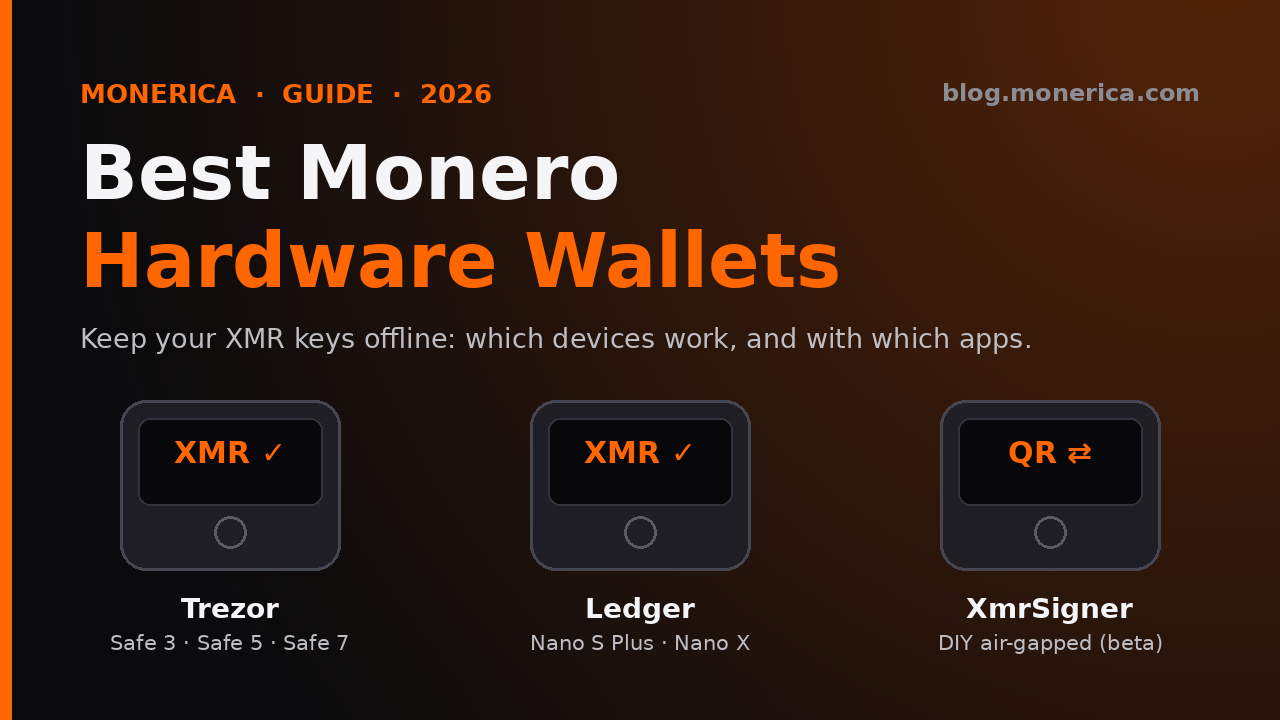
Looking for the best Monero hardware wallet? This guide compares the devices that can actually hold XMR in 2026, shows which wallet app each one works with, and covers the DIY air-gapped option, where to buy, and how to set it up safely. All support details were checked against getmonero.org, Trezor, Ledger, Feather and Cake Wallet documentation in October 2026. For everyday desktop and mobile picks, start with our main best Monero wallet guide.
Quick answer: The best Monero hardware wallet for most people is a Trezor Safe 3 or Safe 5 (open-source firmware) or a Ledger Nano S Plus or Nano X, used with the official Monero GUI or Feather. On a phone, the Trezor Safe 7 or a Ledger Nano X works with Cake Wallet. Power users who want fully air-gapped, QR-based signing can build an XmrSigner (still in beta).
Top Picks (Quick List)
- Trezor Safe 3 / Safe 5 + Monero GUI or Feather: best all-around choice. Open-source firmware, officially supported by the Monero GUI. (Feather lists the Model T and Safe 3.)
- Trezor Safe 7 + Cake Wallet: best for phone users. Trezor says the Safe 7 works with Monero through Cake Wallet on iPhone and Android.
- Ledger Nano S Plus / Nano X + Monero GUI or Feather: widely available and officially supported. The Nano X also connects to Cake Wallet over Bluetooth.
- DIY air-gapped XmrSigner: for power users who want a device with no USB data, Wi-Fi or Bluetooth link at all. Open source, built on SeedSigner hardware; still beta software.
Monero Hardware Wallets Compared
| Device | Works with (Monero) | Connection | Firmware | Best for |
|---|---|---|---|---|
| Trezor Safe 5 | Monero GUI, CLI; Cake Wallet (Android) | USB-C | Open source | Desktop users who want a touchscreen |
| Trezor Safe 3 | Monero GUI, Feather, CLI; Cake Wallet (Android) | USB-C | Open source | Best value; widest app support |
| Trezor Safe 7 | Cake Wallet (iPhone and Android) | USB-C, Bluetooth | Open source | Phone-first users |
| Trezor Model T | Monero GUI, Feather, CLI; Cake Wallet (Android) | USB-C | Open source | Existing owners |
| Ledger Nano X | Monero GUI, Feather, CLI; Cake Wallet (iPhone and Android) | USB-C, Bluetooth | Closed source (apps open) | Desktop and phone |
| Ledger Nano S Plus | Monero GUI, Feather, CLI; Cake Wallet (Android) | USB-C | Closed source (apps open) | Budget Ledger option |
| Ledger Flex / Stax | Cake Wallet (iPhone and Android); Ledger also lists the Monero GUI | USB-C, Bluetooth | Closed source (apps open) | Touchscreen Ledger owners |
| XmrSigner (DIY) | Feather / Monero GUI via its companion app | QR codes only (air-gapped) | Open source (beta) | Maximum isolation, hands-on users |
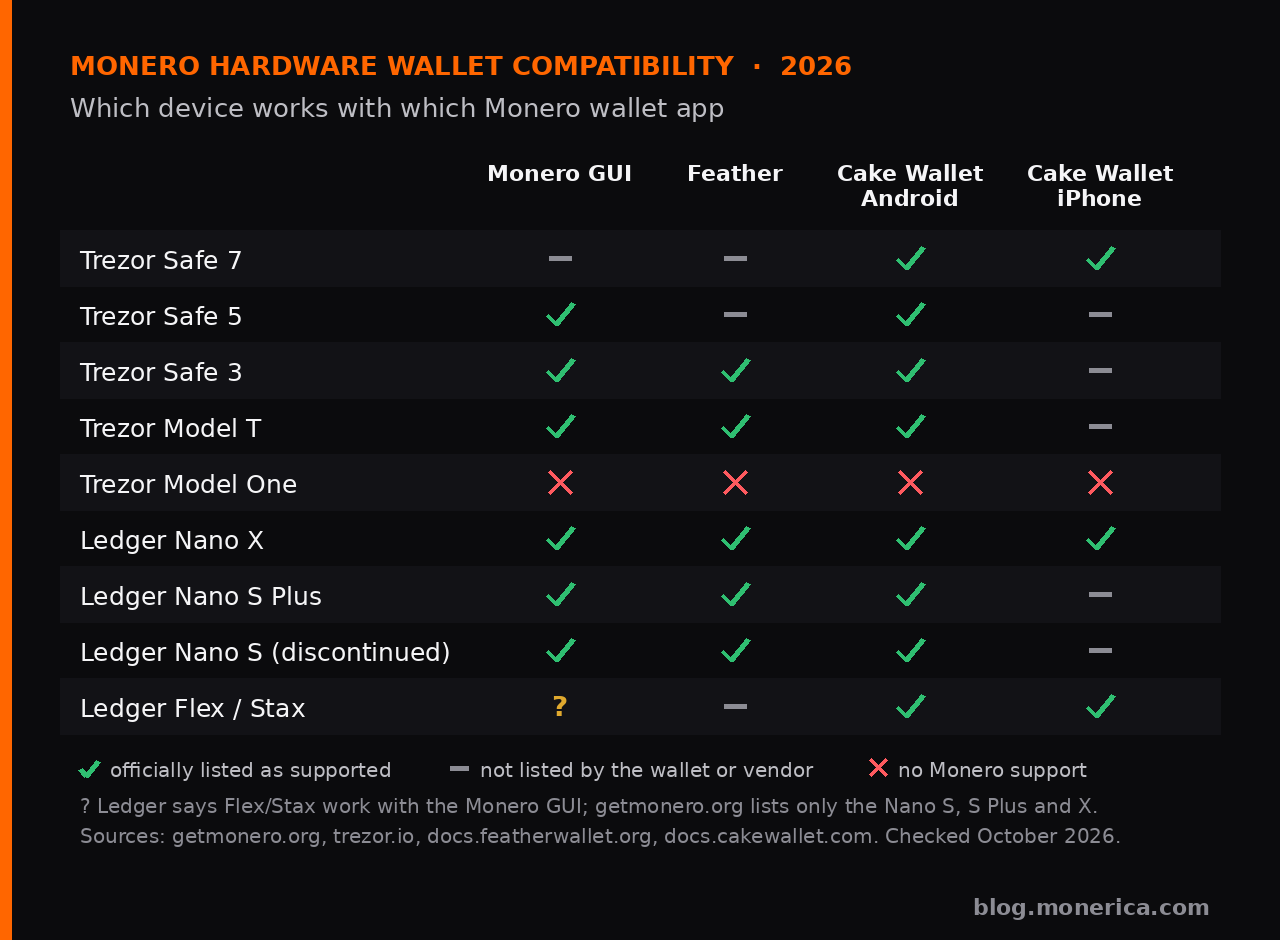
The Trezor Model One does not support Monero. Trezor Suite and Ledger's own app do not manage XMR; you always pair the device with a Monero wallet app. Product details beyond Monero support (screens, prices) change often, so check the maker's site.
Why Hardware Wallets Matter for Monero
- Cold storage: your private spend key stays on the device, away from malware on your computer or phone.
- Signing on the device: transactions are confirmed on the device's own screen, so a compromised computer can't silently change the amount or address.
- Privacy: the device doesn't change Monero's privacy. That still comes from your wallet app: use fresh subaddresses and, ideally, your own node.
- Durable backups: use metal seed backups to protect against fire or water damage.
Trezor for Monero
Trezor's Monero guide lists the Safe 7, Safe 5, Safe 3 and Model T as Monero-capable. On desktop, the Safe 5, Safe 3 and Model T work with the Monero GUI and CLI (Feather's docs list the Model T and Safe 3). The Safe 7 is currently supported only through Cake Wallet, on both iPhone and Android. Trezor's firmware is open source, which is the main reason many Monero users prefer it.
- Buy direct from the official Trezor store and update the firmware in Trezor Suite (Suite itself doesn't hold XMR).
- Install the latest Monero GUI or Feather and verify the download.
- In the wallet, choose to create a new wallet from a hardware device, pick Trezor, and confirm on the device.
- Set a restore height, let it sync, then send a small test amount before moving larger sums.
Ledger for Monero
The Monero Project lists the Ledger Nano S, Nano S Plus and Nano X as supported, and Feather lists the same three. You install the Monero app on the device through Ledger's app, then use the Monero GUI or Feather as the wallet. Ledger's Monero page also suggests the Flex and Stax with the GUI, but getmonero.org doesn't list those two yet, so test with a small amount first. On phones, Cake Wallet supports Ledger over Bluetooth (Nano X, Flex, Stax) and over USB on Android.
- Pros: officially supported on desktop, Bluetooth phone support with Cake Wallet, widely sold.
- Cons: the device firmware is closed source, and the optional Ledger Recover seed-backup service (announced 2023) worried many privacy-focused users. The original Nano S is discontinued.
- Buy: only from the official Ledger store or authorized resellers.
DIY Air-Gapped: XmrSigner (SeedSigner Hardware)
XmrSigner is an open-source, Monero-specific fork of the SeedSigner project. It runs on the same low-cost parts as a SeedSigner (a Raspberry Pi Zero v1.3 with no Wi-Fi or Bluetooth, a small screen and a camera, roughly $40–50 according to the project) and never connects to anything: transactions move between your online wallet and the signer as QR codes. It supports 25-word Monero seeds and 16-word Polyseed, and its companion app works with Feather and the Monero GUI.
- Status: beta (v0.11.2, July 2026). The project itself says to test on testnet first and use at your own risk.
- Hardware: buy SeedSigner-compatible parts or a kit from a seller such as XmrStreet, then flash the XmrSigner image yourself and verify it.
- Best for: technical users who want the strongest isolation and can live with a DIY setup and slower workflow.
Prefer software-only cold storage? Feather and the Monero GUI can both sign transactions on an offline computer. See how to store Monero offline.
How to Choose the Best Monero Hardware Wallet
- Check the exact model. Monero support differs by model (the Trezor Model One has none). Use the chart above.
- Match your wallet app. Desktop users want Monero GUI or Feather support; phone users want Cake Wallet support.
- Open source: prefer firmware that can be audited (Trezor, XmrSigner).
- Supply chain: buy direct from official stores or verified sellers, never second-hand.
- Backups: plan for secure seed storage (paper and metal), and keep it offline.
Setup Checklist
- Back up your recovery seed offline; never type it into a computer, phone or website.
- Consider a passphrase for added security (and store it separately).
- Update the device firmware and install the latest Monero wallet app; verify downloads.
- Run your own node for maximum privacy, or connect to a trusted remote node. See should you run your own Monero node?
- Send a small test transaction, and test a restore, before moving larger amounts.
A Note on FCMP++
Monero's next major upgrade (FCMP++ with the new Carrot address scheme) entered public testing in October 2026, with no confirmed mainnet date yet. When it activates, expect to update both your hardware wallet firmware and your Monero wallet app before transacting.
FAQ
What is the best Monero hardware wallet overall?
For most people, a Trezor Safe 3 or Safe 5 used with the Monero GUI (or a Safe 3 with Feather). A Ledger Nano S Plus or Nano X is the main alternative. For phone use, a Trezor Safe 7 or Ledger Nano X with Cake Wallet.
Does Ledger support Monero?
Yes. The Monero Project lists the Ledger Nano S, Nano S Plus and Nano X as supported, and Feather supports the same models. You install the Monero app on the device, then use Monero GUI or Feather; Ledger's own app doesn't manage XMR. Cake Wallet also supports Ledger on phones.
Does Trezor support Monero?
Yes: the Safe 7, Safe 5, Safe 3 and Model T. The Trezor Model One does not. Trezor Suite doesn't show XMR; use the Monero GUI, Feather or Cake Wallet.
Can I use a Trezor Safe 7 with the Monero GUI?
Not according to Trezor's current support table, which lists the Safe 7 only with Cake Wallet (iPhone and Android). Check Trezor's Monero page for updates.
Is Feather or Monero GUI better with a hardware wallet?
Both work. The GUI is the official wallet and can run your own node; Feather is lighter and has Tor built in. See Feather vs Monero GUI.
What if I want maximum isolation?
A DIY air-gapped XmrSigner, paired with your own node, or an offline computer that signs transactions. Both keep keys away from any networked device.
Where do I buy trusted hardware?
Directly from the official Trezor or Ledger stores, or SeedSigner parts and kits from a reputable seller such as XmrStreet, to reduce supply-chain risk.
Related Articles
- Best Monero Wallet (2026)
- Feather Wallet vs Monero GUI
- Best Monero Wallet for Android
- Best Monero Wallets for iOS
- How to Store Monero Offline
- The Most Private Monero Setup
- How To Buy Monero
- Best Monero Exchanges