Accepting Monero (XMR) takes an afternoon: there’s no merchant account to apply for and no chargebacks, and the money lands in a wallet you control. This guide covers the three ways to do it, from a simple wallet address to a full checkout plugin, the payment gateways worth using, and how to handle pricing, refunds and accounting.
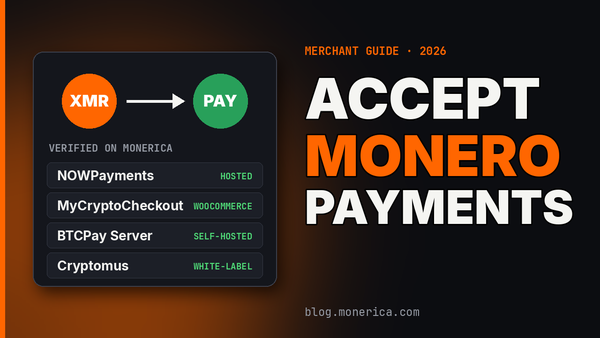
Quick picks: NOWPayments (best hosted gateway), MyCryptoCheckout (best non-custodial WooCommerce plugin), BTCPay Server (best self-hosted, with an official Monero plugin), Cryptomus (best white-label; referral code 7oxg00) and MixPay (take many coins, settle in XMR).
Disclosure: some links are referral links; Monerica may earn a commission at no cost to you.
▶ Also on Monerica Video (no JavaScript, works over Tor)
Why Businesses Accept Monero
- No chargebacks. Monero payments are final once confirmed, so there’s no fraud-reversal risk.
- Low fees. Card processing often costs 2–4% plus a fixed fee. Direct-to-wallet XMR costs only the tiny network fee, and gateways typically charge 0.5–1%.
- Fast, global settlement. Payments confirm in minutes, any day, from anywhere, with no bank holding funds.
- Less customer data to protect. You never handle card numbers, and payments aren’t broadcast on a public ledger.
- New customers. Privacy-minded buyers look for shops that take Monero, and Monerica helps them find you.
Three Ways to Accept Monero
1. Wallet Only (Simplest, Free)
All you need is a Monero wallet: the official Monero GUI on desktop or a mobile wallet (see the best Monero wallets). Create a new subaddress for each order or customer, show it as text or a QR code, and match payments by subaddress and amount. It’s free, fully in your custody, and ideal for freelancers, small shops and in-person sales. Our step-by-step guide to accepting a Monero transfer walks through it, including a 60-second in-person flow.
2. Self-Hosted Payment Processor (Full Control)
BTCPay Server is free, open-source and self-hosted, and its official Monero plugin lets you accept XMR directly into your own wallet, with invoices, order tracking and store plugins (see BTCPay Server’s Monerica profile). MoneroPay is a lighter, Monero-only open-source payment API for developers (MoneroPay’s Monerica profile). Self-hosting means no third party holds your funds, but you run and update the server.
3. Hosted Gateway or Store Plugin (Fastest Setup)
A hosted gateway generates invoices, tracks confirmations and marks orders paid for you, and most plug into Shopify, WooCommerce, WHMCS and similar platforms. The trade-off: some hold funds briefly, and converting to fiat for bank withdrawals usually requires identity checks.
How to Accept Monero With Just a Wallet: Step by Step
- Install a wallet you control and write the seed phrase down offline. On a computer, the official Monero GUI works well; on a phone, use one of the best Monero wallets.
- Create a new subaddress for each order or customer. In the Monero GUI this is under Receive; label it with the order number. Separate subaddresses tell you exactly who paid, and customers can't link your payments to each other.
- Show the amount and address together. Most wallets can make a QR code that includes the amount, so the customer just scans and confirms. Quote prices in your own currency and convert to XMR at the moment of sale.
- Watch for the payment. It appears in your wallet within seconds as unconfirmed. For low-value, in-person sales many merchants hand over the goods at that point; for larger orders, wait for confirmations (see how many confirmations Monero needs).
- Record it. Note the date, the order, the XMR amount and its value in your currency for your books. If a customer needs proof, they can give you a transaction key to verify the payment (see Monero explorers).
That's all a freelancer or small shop needs. Once orders grow, a processor (below) does the subaddresses, price conversion and order matching for you.
Accepting Monero in Person
At a counter or a market stall, a phone wallet is enough: type the amount, show the QR code, and wait until the payment appears. The Monero GUI also has a merchant view that shows incoming payments to a subaddress as they arrive. For a fixed till, a self-hosted BTCPay Server with the Monero plugin gives you a point-of-sale page on a tablet. Put a "Monero accepted" sign up, and list the shop on a map so local users can find it (see Monero maps).
Best Monero Payment Gateways and Plugins
NOWPayments – Best Overall Hosted Gateway
NOWPayments: Wide plugin support (Shopify, WooCommerce, Magento, WHMCS and more), 300+ coins, a base fee around 0.5%, optional auto-conversion and simple onboarding. A good pick if you want to launch quickly. Our WordPress + WooCommerce + NOWPayments tutorial shows the full setup (also on Monerica Video). See NOWPayments’s Monerica profile.
MyCryptoCheckout – Best Non-Custodial WooCommerce Plugin
MyCryptoCheckout: Payments go straight to your wallet with no middleman holding funds. Enable Monero, add a wallet address, set how many confirmations you require, and test with a small order. See MyCryptoCheckout’s Monerica profile.
BTCPay Server – Best Self-Hosted
BTCPay Server: Open-source and self-hosted, with an official Monero plugin. Best if you or a host can run a server and want full control of your data and funds. See BTCPay Server’s Monerica profile.
Cryptomus – Best White-Label
Cryptomus: Branded checkout, payout routing, mass payouts and team roles, with settlement in XMR, other crypto or fiat where available. Referral code 7oxg00. See Cryptomus’s Monerica profile.
MixPay – Take Many Coins, Settle in XMR
MixPay: Customers pay in whatever crypto they hold while you receive Monero (or the reverse). API and point-of-sale options are available. See MixPay’s Monerica profile.
CryptoWoo – WordPress Plugin
CryptoWoo: A WordPress plugin that lets WooCommerce stores accept Monero and other coins paid directly to their own wallet. See CryptoWoo’s Monerica profile.
Other gateways verified on Monerica include Heleket, 1pay.cx and Coin Moebius; compare them all in Monerica’s payment integrations list.
Which Option Should You Choose?
- Freelancer, one-off invoices or in person: wallet only, with a subaddress per payment.
- WooCommerce, keep custody: MyCryptoCheckout or CryptoWoo.
- Shopify or many platforms, fastest launch: NOWPayments.
- Several brands or high volume: Cryptomus.
- Developers who want full control: BTCPay Server or MoneroPay.
Pricing, Volatility and Accounting
- Price in your currency. Show prices in USD or EUR and convert to XMR at checkout; gateways do this automatically.
- Manage volatility. If you need fiat, use a gateway with auto-conversion, or convert a share of each day’s takings yourself.
- Keep records. Save the invoice, transaction ID and the exchange rate at the time of sale for bookkeeping and taxes. A view-only wallet lets your accountant see incoming payments without being able to spend them.
- Hot and cold wallets. Keep a small wallet for daily sales and move the rest to a hardware wallet.
Refunds, Underpayments and Overpayments
- Publish a refund policy and ask for a Monero refund address when a refund is due.
- Underpayments: hosted gateways usually let the customer top up; with a plain wallet, ask for the difference to the same subaddress.
- Confirmations: for small orders, 1–2 confirmations is usually fine; for larger ones, wait for 10 (about 20 minutes). See how many confirmations Monero needs.
Get Found by Monero Customers
Once you accept XMR, tell people: add a “We accept Monero” badge at checkout and list your business on Monerica, where people look for places to spend Monero. Browse merchants that accept XMR for ideas.
Set It Up in 15 Minutes
- Install a Monero wallet and write down the seed phrase offline.
- Decide: wallet only, self-hosted, or a hosted gateway.
- Connect it to your checkout (plugin or payment button), or print a QR code for the counter.
- Make a small test payment and check the order is marked paid.
- Announce it, and add your business to Monerica.
FAQ
How do I accept Monero payments?
Either share a Monero subaddress or QR code from your wallet, run a self-hosted processor such as BTCPay Server, or use a hosted gateway such as NOWPayments that adds Monero to your checkout.
What is the best Monero payment gateway?
NOWPayments for a quick hosted setup, MyCryptoCheckout for non-custodial WooCommerce, and BTCPay Server for self-hosting.
Can I accept Monero on WooCommerce or Shopify?
Yes. WooCommerce works with MyCryptoCheckout, CryptoWoo, NOWPayments and BTCPay Server; Shopify works with hosted gateways such as NOWPayments.
Is Monero too volatile for a business?
Price in your own currency and use auto-conversion, or convert part of your takings, if you don’t want to hold XMR.
Do I need a business account?
No. A wallet is enough to start; gateways may ask for verification only if you withdraw to a bank.
Can I accept Monero without a payment processor?
Yes. Give each customer a new subaddress from your own wallet and check payments yourself. It costs nothing beyond the network fee the customer pays, and no one else holds your funds.
How many confirmations should a merchant wait for?
Small in-person sales are often accepted once the payment appears. For online orders and larger amounts, wait for several confirmations; funds become spendable after 10 (about 20 minutes).
Do I need KYC to accept Monero?
Not to receive XMR into your own wallet. Hosted gateways set their own rules, and the step that usually needs identity checks is converting to fiat and withdrawing to a bank. Compare options in Monerica's merchant services directory.
Related Articles
- How to Accept a Monero (XMR) Transfer
- Accept Monero With WordPress, WooCommerce and NOWPayments
- Merchants That Accept XMR
- Best Monero Wallet
- How to Buy Monero