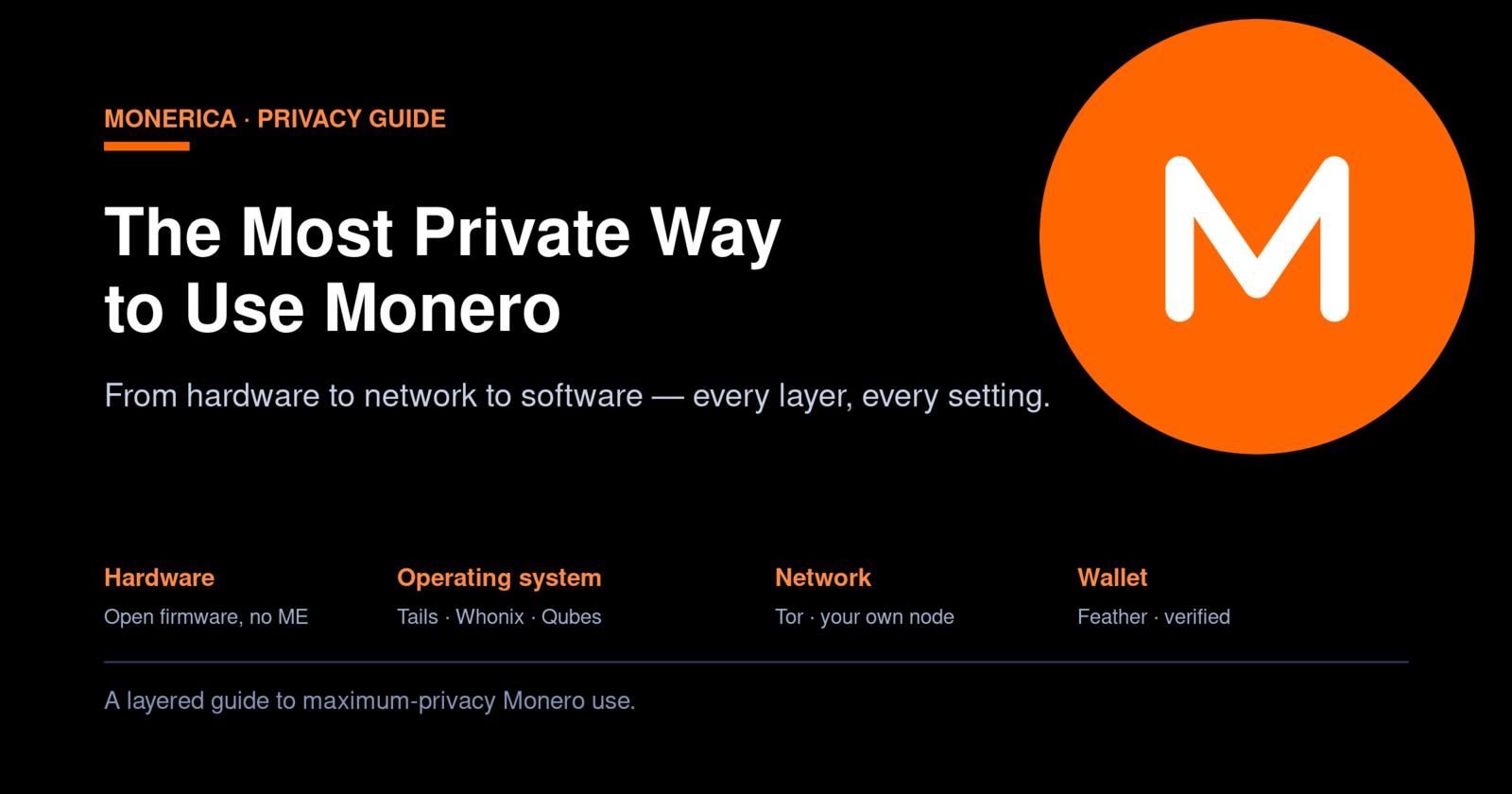
Monero already gives you the strongest privacy of any widely used cryptocurrency. Ring signatures, stealth addresses, and confidential transactions hide the sender, receiver, and amount of every payment on the blockchain. But on-chain privacy is only half the story. The moment you download a wallet, sync to a node, or open a browser, your device and your network can leak everything the blockchain worked so hard to conceal — your IP address, your location, the fact that you use Monero at all, and enough metadata to tie it back to your name.
True Monero privacy is a stack. This guide walks that stack from the bottom up — hardware, firmware, operating system, network, and wallet — so you can build the most private setup your situation calls for.
Privacy is a stack, not a switch
Think of your privacy as a series of layers stacked on top of one another. Monero's cryptography sits near the top, but it rests on everything underneath: the wallet software, the network path, the operating system, and the physical machine. A weakness in any lower layer can undo the privacy of every layer above it.
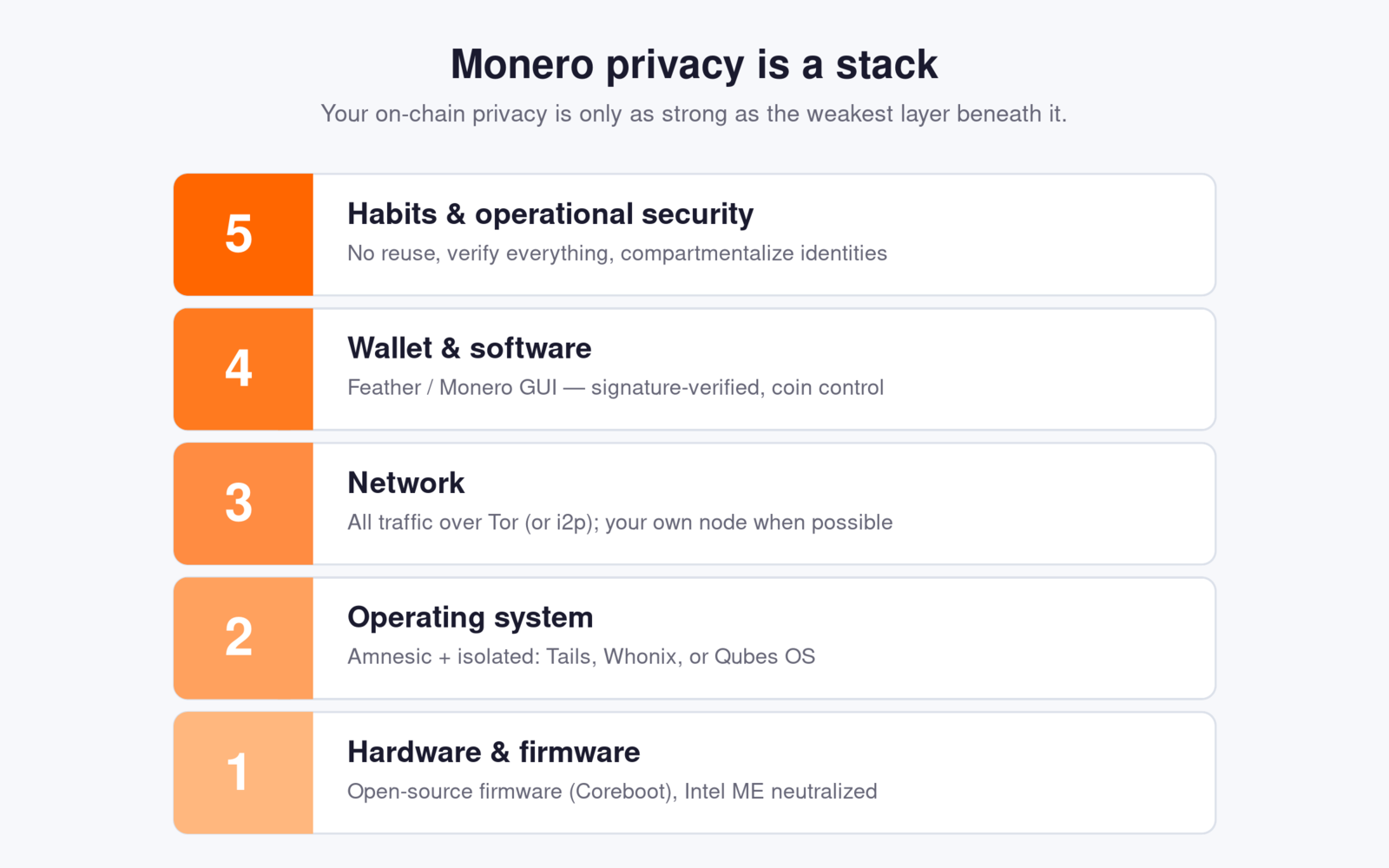
You don't have to build every layer to a maximum. The right depth depends on your threat model — who you are protecting against and what happens if they succeed. A casual user hiding purchases from data brokers needs less than a journalist or activist facing a nation-state. Build up the stack until it comfortably exceeds your threat model, and no further.
The operating system: amnesia and isolation
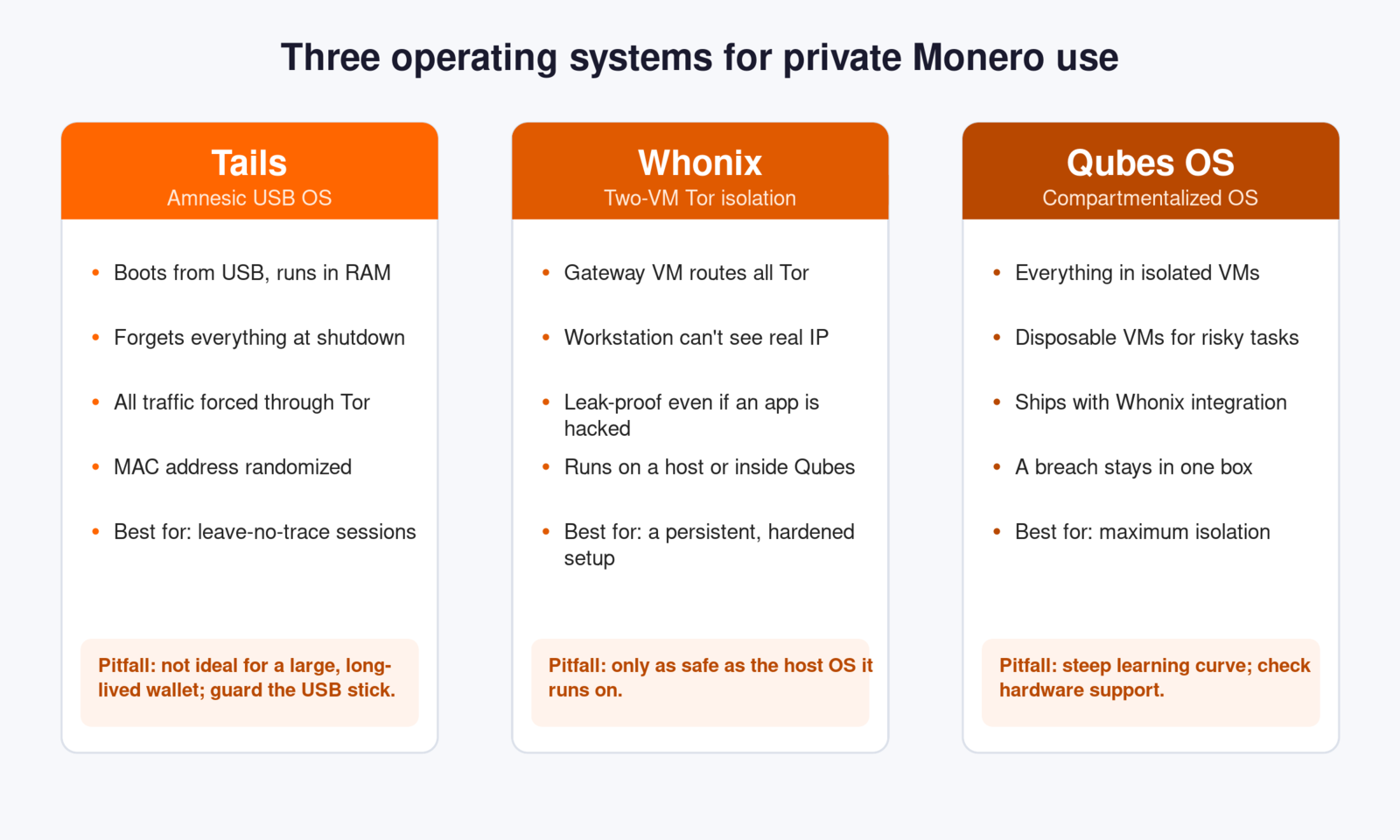
Your everyday operating system is the worst place to use Monero privately. It is full of telemetry, background services, browser fingerprints, cached files, and software that phones home. Two ideas fix this: amnesia (the system forgets everything when you shut down) and isolation (a compromise in one place can't reach the rest). Three purpose-built systems deliver these in different ways.
Tails — the amnesic USB system
Tails is a Debian-based operating system you boot from a USB stick. It runs entirely in RAM, routes all network traffic through the Tor network, and forgets everything the instant you power off. Nothing is written to the computer's hard drive, so when you're done there is no trace on the machine at all.
Why it works: because Tails is amnesic and Tor-only by design, a single session leaves almost nothing behind and never reveals your real IP address to a Monero node or website. You can add a Monero wallet (Feather Wallet runs well on Tails) and use it inside that protected bubble.
Pitfalls: Tails is built for short, self-contained sessions, not for managing a large wallet you sync constantly. You can enable an encrypted Persistent Storage for your wallet files, but that reduces the “leave no trace” benefit — treat that USB stick like a key to a safe. Tails also can't protect you from compromised hardware or firmware underneath it, and booting from an untrusted machine (say, a public library PC) exposes you to hardware keyloggers and tampered firmware.
Whonix — two-VM Tor isolation
Whonix takes a different approach. It splits your setup into two virtual machines: a Gateway that does nothing but run Tor, and a Workstation where you actually work. The Workstation has no way to reach the internet except through the Gateway, so even if a wallet or browser in the Workstation is fully compromised, it physically cannot discover your real IP address — it only ever sees the Gateway.
Why it works: this “fail-closed” design defeats the most common deanonymization attack, where malware tries to make a direct connection outside of Tor to leak your IP. With Whonix that connection has nowhere to go.
Pitfalls: Whonix runs on top of a host operating system (often via VirtualBox or KVM). If that host is compromised or is a spyware-laden everyday OS, your isolation is undermined. This is exactly why many people run Whonix inside Qubes.
Qubes OS — security by compartmentalization
Qubes OS treats your whole computer as a collection of isolated compartments (“qubes”), each running in its own virtual machine. Your Monero wallet can live in one qube, your browsing in another, your email in a third — and a breach in one is trapped there. Qubes integrates Whonix directly, so you can run your wallet in a Whonix Workstation qube that is forced through Tor, and spin up disposable qubes that vanish after each use.
Why it works: it assumes any single component can be breached and contains the damage. This is the closest thing to a personal fortress for high-risk users.
Pitfalls: Qubes has a real learning curve and specific hardware requirements — you need a machine with the right virtualization support (VT-x/VT-d or AMD equivalents). Check the hardware compatibility list before committing.
The hardware layer: why the chip matters
Here is the layer most people never think about. Underneath your operating system sits firmware and a processor that you do not control — and on most modern computers, a hidden second computer runs alongside your main one.
The problem: Intel ME and AMD PSP
Nearly every modern Intel chip contains the Intel Management Engine (ME): a small, closed-source subsystem with its own processor and firmware that runs beneath your operating system, has deep access to memory and the network, and keeps running even when the machine is “off.” AMD ships an equivalent called the Platform Security Processor (PSP). These exist for legitimate remote-management reasons, but because they are proprietary and effectively un-auditable, they represent a large piece of trusted, unverifiable code sitting below everything you do — a genuine concern if your threat model includes sophisticated adversaries.
The fix: open-source firmware and neutralized management engines
You can't fully delete the ME, but you can replace the proprietary BIOS with open-source firmware and neutralize the management engine so it does as little as possible:
- Coreboot — an open-source firmware/BIOS replacement that strips proprietary code down to the minimum needed to boot.
- Heads — a security-focused boot firmware that uses a TPM to detect tampering with your firmware and boot files.
- me_cleaner / the HAP bit — techniques that switch the Intel ME into a disabled state early in boot, shrinking its attack surface dramatically.
Where NovaCustom fits in
Configuring open firmware yourself is advanced and risky (a bad flash can brick a laptop). This is where privacy-focused hardware vendors come in. NovaCustom — a computer maker you'll find among the privacy vendors on the Monerica network — ships laptops with open-source Dasharo/Coreboot firmware, the Intel ME neutralized out of the box, and physical hardware kill switches for the camera, microphone, and wireless. That means the open-source hardware groundwork is already done for you: a machine you can actually trust as the foundation of the stack, and one you can buy with Monero.
Older options exist too — certain ThinkPad models can run Libreboot — but purpose-built modern hardware like NovaCustom's saves you the hardest work and comes with current security support.
The network: route everything through Tor
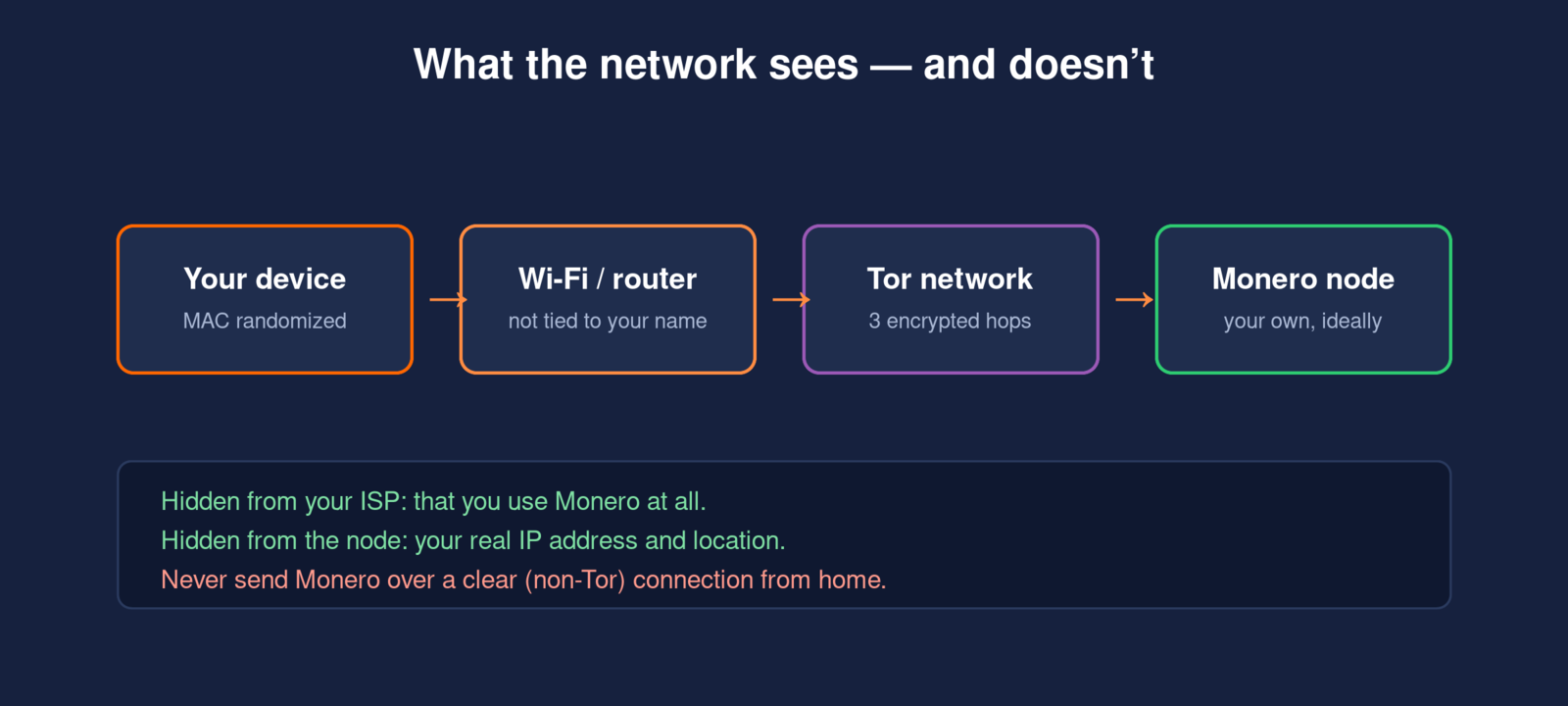
Even with a perfect wallet and a hardened OS, your network can betray you. When your wallet syncs to a Monero node, that node sees the IP address the request came from. Your internet provider, meanwhile, can see that you're connecting to Monero infrastructure. The answer is to never let either happen in the clear.
Tor (and i2p)
Tails and Whonix already force all traffic through Tor, which bounces your connection through three encrypted relays so no single point knows both who you are and what you're doing. The node sees a Tor exit, not you; your ISP sees Tor, not Monero. Monero also supports i2p as an alternative anonymizing network, which some users run alongside Tor for added resilience.
Run your own node
The strongest choice is to run your own Monero node and point your wallet at it over Tor (or over your local network if the node lives on the same trusted machine). With your own node you never hand your transaction queries to a stranger's server at all. If that's too much, connect to a reputable remote node over Tor — the Tor layer still hides your IP from it. Never connect a wallet to a random remote node over a clear connection from your home.
Wi-Fi and the physical connection
Your network hardware carries identifiers too. A few practical steps:
- Randomize your MAC address — Tails does this automatically; make sure it's enabled on any system you use so your device's unique hardware ID isn't broadcast.
- Use a connection that isn't tied to your identity for the highest-stakes activity — your home internet account is registered to your name and address.
- Turn radios off when idle — Wi-Fi and Bluetooth constantly announce your device. Hardware kill switches (as on NovaCustom machines) make this physical, not just a software toggle.
- Keep smart-home and IoT devices off the same network — they are chatty and poorly secured, and they widen your footprint.
The wallet and software settings
Finally, the layer you actually touch. Two principles matter most: use privacy-respecting software, and verify it before you run it.
- Choose a privacy-first wallet. Feather Wallet is a lightweight Monero wallet with Tor built in and strong coin-control features. The official Monero GUI/CLI from getmonero.org is the reference implementation and pairs perfectly with your own node.
- Verify the download's signature. Supply-chain tampering is real. Check the GPG signature (and hashes) published by the project before installing — this confirms you got the genuine binary and not a malicious copy.
- Connect over Tor to your own or a trusted node, as above. In Feather this is a couple of clicks; in the Monero GUI, point it at your node and enable proxying through Tor.
- Use subaddresses and avoid reuse. Generate a fresh subaddress for each person or purpose so incoming payments aren't trivially linked to one another.
- Keep this identity separate. Don't log into personal accounts, email, or social media in the same session you use for private Monero activity — that's the fastest way to link everything back to you.
Putting it all together
Here is what a maximum-privacy Monero setup looks like when every layer reinforces the next. Build as far up this list as your threat model requires:
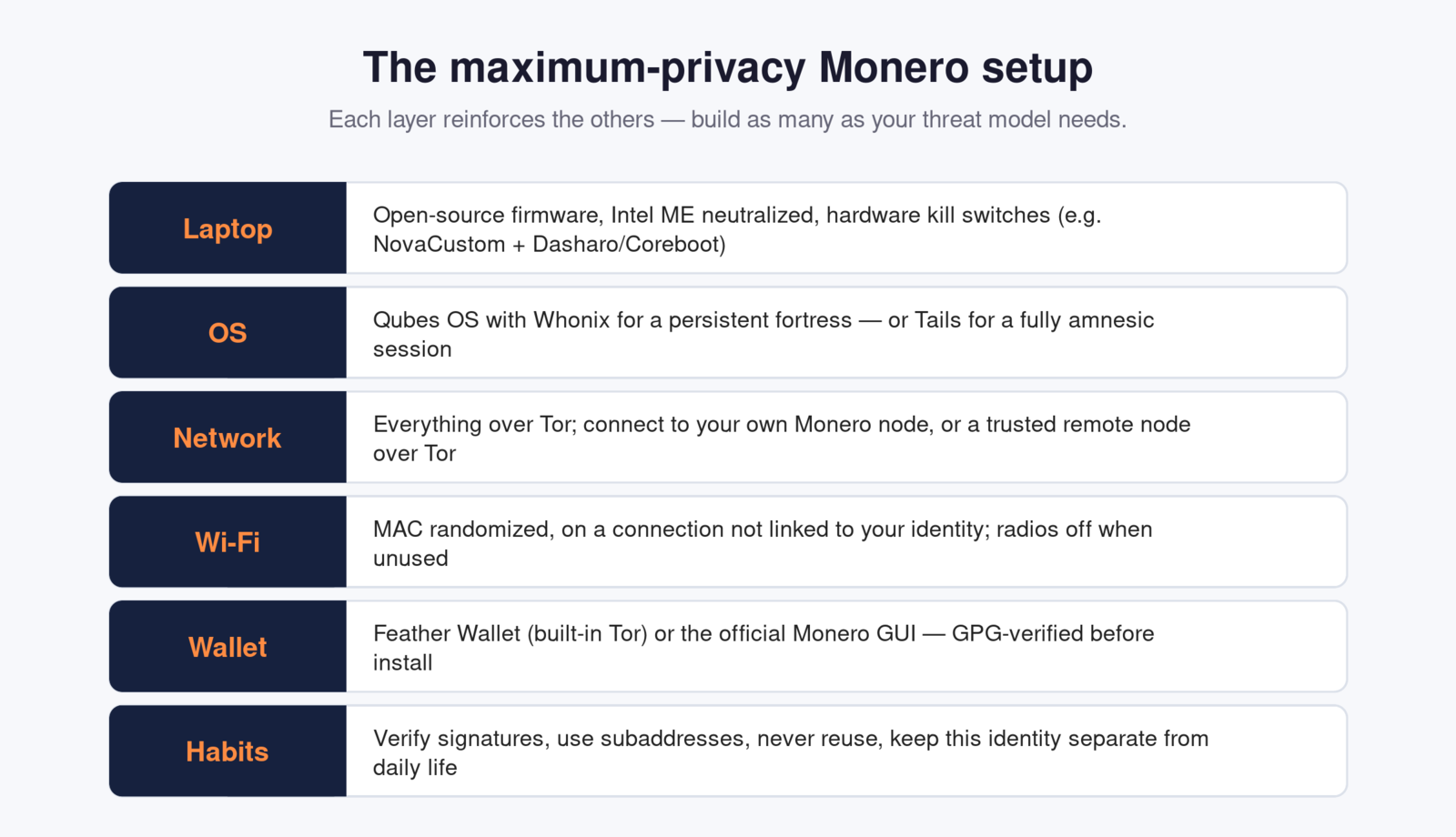
- Hardware: a laptop with open-source firmware and a neutralized Intel ME — e.g. a NovaCustom machine with Dasharo/Coreboot and hardware kill switches — bought with Monero.
- Operating system: Qubes OS running Whonix for a persistent, compartmentalized fortress, or Tails for a fully amnesic, leave-no-trace session.
- Network: every connection over Tor, syncing to your own Monero node (or a trusted remote node over Tor).
- Wi-Fi: MAC address randomized, on a connection not linked to your name, radios physically off when unused.
- Wallet: Feather Wallet or the official Monero GUI, GPG-verified, proxied through Tor.
- Habits: verify everything, use subaddresses, never reuse, and keep this identity walled off from your everyday life.
Common pitfalls to avoid
- Using a hardened OS on compromised hardware. Tails on a machine with a tampered BIOS or a hardware keylogger is not safe. The hardware layer is the foundation.
- Leaking your IP to a remote node. Convenient public nodes over a clear connection can log the IPs of everyone who queries them. Always use Tor, or your own node.
- Mixing identities. Checking personal email in the same session collapses your anonymity instantly.
- Skipping signature verification. An unverified wallet binary can be a trojan. Thirty seconds of checking a signature is cheap insurance.
- Over-building and never using it. A setup so painful you avoid it protects no one. Match the effort to the real threat, and make it something you'll actually use.
The bottom line
Monero gives you private money; the stack around it gives you a private life with that money. Start where you are — even just running Feather over Tor is a big step — and add layers as your needs grow: a hardened OS like Tails or Qubes, your own node, and ultimately open-source hardware from a vendor like NovaCustom that you can buy with Monero itself. Built together, these turn Monero from a private coin into a genuinely private way to live.
This article is educational and not security or legal advice. Evaluate tools against your own threat model, and verify everything you download.