Want to buy a VPS with Monero? These four hosts accept Monero (XMR) for virtual private servers: BTCVPS, MyNymBox, Servers Guru and BlueVPS. All four are listed in the Monerica Web Hosting directory. Monerica isn't endorsing any of them — this guide shows where each one is located, what you need to sign up, and how paying with XMR works there, so you can decide for yourself.
The comparison table comes first. Below it, each host gets its own section, followed by a step-by-step guide to paying for a VPS with Monero and what to check before you buy.
Some links below are affiliate links; Monerica may earn a commission at no cost to you.
Prefer to browse the full, always-current list? See the entire Web Hosting category on Monerica, or jump straight to VPS Hosting.
Quick Answer
- Email-only signup, XMR paid directly to the host: BTCVPS (Netherlands) and MyNymBox (Netherlands and Finland).
- More regions from one email-only account: Servers Guru (Europe, North America and Singapore).
- The widest choice of server locations: BlueVPS, with about 20 locations on five continents. It asks for more account details than the others.
- New to this? See the step-by-step guide to paying with XMR, then what to look for in a VPS.
How to Buy a VPS With Monero in Short
A Monero VPS (also called an XMR VPS) is an ordinary virtual private server that you pay for with Monero instead of a card. To buy a VPS with Monero, pick a host from the list below, choose a plan and location, select Monero (XMR) at checkout and send the exact amount shown to the payment address from your own wallet. Monero needs about 10 confirmations, roughly 20 minutes, before a payment counts as settled, and the host then sets up your server. Several of the hosts here only ask for an email address at signup. Pay from a wallet you control rather than straight from an exchange, and check the step-by-step guide before you send. For timing details, see how long a Monero transfer takes.
Monero VPS Hosting Compared: 4 Hosts That Accept XMR
Details were checked on each provider's own website in November 2026. Plans and locations change, so confirm on the provider's site before you pay.
| Provider | How you pay with XMR | Server locations | Sign-up | What you can rent | Get it |
|---|---|---|---|---|---|
| BTCVPS | Directly: own Monero node and own payment gateway | Netherlands | Email only | KVM VPS (encrypted host storage) | btcvps.com |
| MyNymBox | Directly: self-hosted crypto gateway | Netherlands (Amsterdam region), Finland | Email only, alias accepted | KVM VPS, shared hosting, domains | mynymbox.io |
| Servers Guru | XMR at checkout (also cards, PayPal, other coins) | Netherlands, Germany, Finland, USA, Canada, Singapore | Email only | VPS, unmetered, 10 Gbps and ARM VPS, cloud and dedicated servers, web hosting | servers.guru |
| BlueVPS | Through the Heleket crypto gateway | About 20 locations: USA, Canada, UK, much of Europe, Israel, UAE, Hong Kong, Singapore, Australia | Name, email and postal address; ID can be requested | KVM VPS (Linux and Windows), dedicated servers, colocation | bluevps.com |
Where to Buy a VPS With Monero: The 4 Hosts
Each host below accepts Monero and is listed in the Monerica directory. This isn't an endorsement — it's simply where each one is, what it offers and who it suits. Reviews and full details are on each host's Monerica listing.

BTCVPS — Monero VPS in the Netherlands
Where it is: servers in a Netherlands data center, the only location offered on its site as of November 2026. Sign-up: email only — no ID, no phone number, no personal details.
Paying with XMR: BTCVPS runs its own Monero node and its own payment gateway, so your XMR goes straight to the host with no third-party processor. It also takes Bitcoin and a handful of other coins.
What you get: KVM virtualization with full root access, LUKS-encrypted storage on the host node, DDoS protection and automated setup within about 10 minutes of payment. Plans started at €6 a month (2 GB RAM) as of November 2026. Outgoing email ports are blocked on all plans, so it isn't a mail-server host. Its Monerica listing also shows a Tor mirror.
Who it suits: anyone who wants a straightforward XMR-paid server in Europe with the least personal data possible — for example, a Monero remote node or a VPN.

MyNymBox — Nevis Company, Servers in the Netherlands and Finland
Where it is: the company, Mynymbox Hosting LLC, is registered in Nevis, offshore. Its servers are in the Netherlands (Amsterdam region) and Finland; Sweden is listed as planned. Sign-up: a working email address only, and an alias is fine. Using the client area over Tor or a VPN is explicitly allowed.
Paying with XMR: Monero is taken directly through MyNymBox's self-hosted gateway, along with Bitcoin, Lightning, Litecoin, Zcash and Cashu. It does not take cards, PayPal or wire transfers.
What you get: KVM VPS with root access, VNC and a dedicated IPv4 and IPv6 address (from €4 a month as of November 2026), plus shared web hosting and domain registration in which MyNymBox is the registrant of record. Your server and your domain can live under one anonymous account.
Who it suits: people who want the company outside the EU, servers inside it, and everything (server and domain) paid in Monero in one place.

Servers Guru — Europe, North America and Singapore
Where it is: Servers Guru (operated by Moula World LLC) offers VPS in the Netherlands, Finland, the USA, Canada and Singapore, and its site lists data centers in Germany as well. Sign-up: the site says it only needs your email and no personal information when you pay in crypto.
Paying with XMR: choose Monero at checkout. Servers Guru also accepts Bitcoin, Litecoin, Ethereum, USDT and other coins, plus cards and PayPal. Its site and client area both have Tor mirrors.
What you get: the broadest product range here — standard, unmetered, 10 Gbps and ARM VPS on NVMe storage with DDoS protection, cloud servers with dedicated CPU, dedicated servers, web hosting and S3 object storage. VPS plans started at €4.99 a month as of November 2026.
Who it suits: anyone who wants a server close to users outside Europe, or servers in several regions, from one email-only account and one XMR invoice.

BlueVPS — About 20 Locations Worldwide
Where it is: BlueVPS OÜ is a company based in Tallinn, Estonia, operating since 2016. It offers KVM VPS in about 20 locations: the USA (Los Angeles, Atlanta, Ashburn), Canada, England, the Netherlands, Germany (Frankfurt, Düsseldorf), France, Spain, Italy, Sweden, Poland, Estonia, Bulgaria, Cyprus, Israel, the UAE, Hong Kong, Singapore and Australia.
Sign-up: BlueVPS is a conventional host, not a no-KYC one. Its registration form asks for your name, email and postal address, and its terms of service say the company may ask for a copy of an ID document.
Paying with XMR: crypto goes through the third-party Heleket gateway — choose "Heleket Crypto" as the payment method and pay in Monero. BlueVPS also accepts cards, PayPal, bank transfer and other payment systems.
What you get: KVM VPS for Linux or Windows with full root or administrator access, SSD and NVMe storage, instant setup and a choice of control panels, plus high-load, 10 Gbps and storage VPS, dedicated servers and colocation.
Who it suits: people who need a server in a specific country (the US, Asia, Australia or the Middle East) or a Windows VPS, and who are fine giving the account their real details. Here Monero is a way to pay, not a way to stay anonymous.
These four are just a starting point. For the complete, always-current set of Monero-accepting hosts — offshore, Tor-friendly, domains, and more — browse Monerica's Web Hosting category and the VPS Hosting and Dedicated Servers subcategories.
Monero VPS in Europe With No ID Verification
Three of the four hosts sign you up with an email address only and run servers in the EU, which suits a privacy VPS in Europe paid in Monero:
| Host | European server locations | Sign-up |
|---|---|---|
| BTCVPS | Netherlands | Email only |
| MyNymBox | Netherlands (Amsterdam region), Finland | Email only, alias accepted |
| Servers Guru | Netherlands, Germany, Finland | Email only |
BlueVPS also has European locations, but it asks for more account details. A European server is not automatically more private: the law where the company is registered and what it logs matter as much as where the hardware sits (see server location and jurisdiction below). Details were checked on each provider's site in November 2026.
How to Pay for a VPS With Monero: Step by Step
Paying privately comes down to two things: a host that accepts XMR at checkout, and an account that carries as little personal data as possible. Here's the whole process.
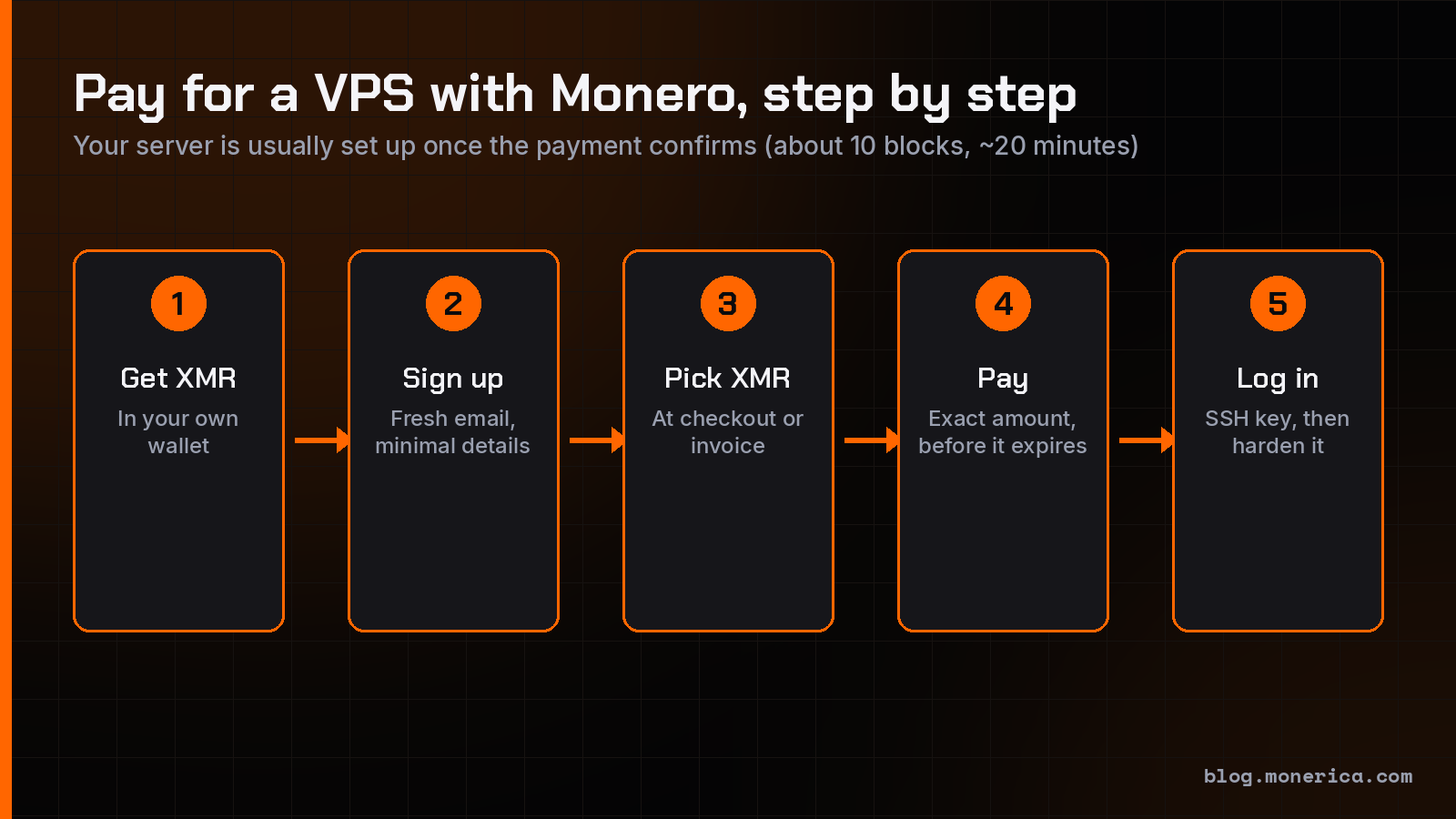
- Get Monero into a wallet you control. Don't pay straight from an exchange account. See the best Monero wallets, and how to buy Monero if you don't have any yet.
- Make a separate email for the host. An alias or a privacy email provider keeps the server apart from your everyday identity. Give only the details the host actually requires.
- Connect over Tor or a VPN if you want to hide your IP from the host during signup. Some hosts run Tor mirrors; their addresses are on their Monerica listings.
- Pick a plan and choose Monero (XMR) at checkout. Some hosts take XMR directly; others route it through a payment processor such as Heleket. Either way, make sure the invoice really shows XMR, not just "crypto."
- Pay the exact amount before the invoice expires. Copy the address and amount carefully, or scan the QR code with your wallet.
- Wait for confirmations. Most hosts provision automatically once the payment confirms, typically after about 10 Monero blocks (around 20 minutes). See how long Monero transfers take.
- Log in with an SSH key and harden the server. Change the default password, turn off password logins, update the OS and set up a firewall before you run anything.
- Renew with Monero the same way. Keep a little XMR aside for renewals so the server doesn't lapse.
Because the payment goes from your wallet to the host and the account has no card or bank details attached, there's no payment record tying the server back to you. Crypto payments are usually non-refundable, so start with the smallest plan.
How to Choose a Monero VPS Host
Beyond price, a handful of things separate a good privacy VPS from a bad one.
Server location and jurisdiction
These are two different questions. The law where the company is registered decides what it can be forced to hand over; the server's location decides latency and which local law applies to the hardware. For a privacy VPS in Europe without ID checks, BTCVPS (Netherlands), MyNymBox (Netherlands and Finland, with the company in Nevis) and Servers Guru (Netherlands, Germany, Finland) all sign you up with an email address only. For servers in Asia, Australia or the Middle East, BlueVPS has the widest spread, and Servers Guru covers Singapore. For more providers, see no-KYC VPS and offshore hosting and Monero dedicated servers.
Payment and signup privacy
A host that runs its own Monero gateway (BTCVPS, MyNymBox) sees your payment and nothing else. A third-party processor adds one more company to the chain. Separately, check what the signup form asks for: the best privacy hosts need only an email, while conventional hosts collect a name and address and may ask for ID.
What the host can still see
Paying in Monero hides who paid, not what the server does. The host still sees the IP addresses you log in from (unless you use Tor or a VPN), the server's traffic and anything stored unencrypted on its disks. It will also act on abuse reports. Treat the VPS as private, not invisible.
Virtualization type and specs
KVM is full virtualization — a real, isolated kernel you fully control, and the right choice for VPNs, custom kernels and most privacy uses. OpenVZ/LXC containers share the host kernel; they're often cheaper but limit what you can run. Compare vCPU cores, RAM, storage type (NVMe SSD is far faster than SATA SSD or spinning disk), bandwidth allowance and port speed.
Network
Look for a dedicated IPv4 address, IPv6 support, and DDoS protection if you're hosting anything public-facing.
Acceptable-use policy
If you plan to run a Tor relay, a VPN, a mail server or anything edgy, read the AUP first. Some hosts welcome it; others forbid it or block the ports (BTCVPS, for example, blocks email ports).
Provisioning, management and terms
Instant (automated) provisioning means your server is live minutes after payment confirms. Snapshots and backups, a control panel, one-click OS installs and responsive support all matter when something breaks. Read the refund and abuse terms before you pay.
Privacy Tips
- Use a fresh email and minimal account data when allowed.
- Prefer Tor/I2P mirrors when available.
- Want the provider's panel and checkout on Tor as well? See the Tor & onion hosting listings and our Tor hosting guide.
- Keep your Monero wallet under your control; don't reuse payment IDs.
What Is a VPS?
A VPS (virtual private server) is a slice of a physical server that behaves like a machine of your own. Each VPS gets a dedicated share of CPU, RAM and disk, its own IP address, and full root (administrator) access. You install whatever OS and software you like and manage it remotely over SSH.
It sits between two other options. Shared hosting is cheaper but cramped — many sites share one environment and you can't install arbitrary software. A dedicated server is a whole physical machine: more power, but far more expensive. A VPS gives you most of that control at a fraction of the cost.
People rent a Monero-paid VPS for websites, Tor onion services, a personal VPN or proxy, a Nextcloud or Git server, or their own Monero node.
A VPS is not the only kind of hosting you can pay for in XMR. Monerica's Web Hosting category is split by type: shared and cloud hosting for a simple website (see our web hosting with Monero guide), GPU servers for AI and rendering, storage and seedboxes, game servers, Tor and onion hosting, and cloud resellers for DigitalOcean, Vultr and Linode servers.
Frequently Asked Questions
How do I buy a VPS with Monero?
Choose a host that lists XMR at checkout, create an account, pick your plan, select Monero on the invoice and pay from your own wallet before the invoice expires. The server is set up once the payment confirms, usually about 20 minutes. The step-by-step guide above covers each stage.
Can I buy a VPS with Monero without KYC?
Yes. BTCVPS, MyNymBox and Servers Guru ask only for an email address, and MyNymBox accepts an alias. Accepting Monero does not by itself make a host no-KYC, though: BlueVPS takes XMR but asks for your name and address and may request ID. Always check the signup form and terms first.
Which VPS hosts accept Monero directly?
BTCVPS runs its own Monero node and payment gateway, and MyNymBox takes XMR through its own self-hosted gateway, so no third-party processor sits between you and the host. BlueVPS accepts Monero through the Heleket gateway. Servers Guru accepts Monero at checkout.
Where are Monero-friendly VPS servers located?
Among the four hosts here: the Netherlands (all four), Finland (MyNymBox, Servers Guru), Germany (Servers Guru, BlueVPS), the USA and Canada (Servers Guru, BlueVPS), Singapore (Servers Guru, BlueVPS), and Hong Kong, Australia, Israel, the UAE and much of Europe (BlueVPS). See the comparison table.
Can I run a Monero node on a VPS?
Yes, on any KVM VPS with enough disk. A full node needs much more storage than a pruned one, so check the plan against the current Monero blockchain size. Our guide to setting up a Monero remote node on a VPS has every command, and how to run a Monero node covers the basics.
How much does a Monero VPS cost?
As of November 2026, entry-level VPS plans started at €4 a month at MyNymBox, €4.99 at Servers Guru and €6 at BTCVPS. Prices scale with vCPU, RAM, storage and bandwidth, so start small and size up later.
Is a Monero VPS legal?
Renting a server and paying with Monero is legal in most countries. What you run on it still has to follow the law and the host's acceptable-use policy. See is Monero legal.
Can I pay for a VPS anonymously with Monero?
You can pay privately: Monero hides the sender, and an email-only host gets no card or bank details. To keep the account apart from you as well, sign up with a separate email over Tor or a VPN and pay from your own wallet, as in the step-by-step guide. The host can still see your server's traffic and the IPs you connect from.
Related Articles
- How To Buy Monero
- How to Buy a Proxy with Monero
- Best Monero Wallet
- How To Run a Monero Node
- Best No-KYC VPS & Offshore Hosting
- BTCVPS Review
- Web Hosting With Monero (2026): Shared & WordPress Hosting for XMR
- Tor Hosting With Monero (2026): Onion Hosting & Tor-Friendly VPS
- Buy DigitalOcean, Vultr & Linode Servers With Monero (2026)