Quick answer: to swap XMR to XRP, open a swap service that lists the pair, paste a classic XRP Ledger address (it starts with r), add a destination tag only if that address belongs to an exchange account, and send your Monero to the deposit address. The XRP usually arrives 20 to 40 minutes later, after about 10 Monero confirmations.
Going from XRP to XMR, copy the destination tag from the deposit screen exactly if one is shown, and remember that the last 1 XRP in your wallet is a reserve you cannot send.
Disclosure: the swap services named here are current Monerica main sponsors. Each name links to its Monerica profile, where its reviews, terms and full details are listed. Facts in this guide were checked in November 2026.
Why people swap between XMR and XRP
- Moving value to an exchange that lists XRP but not XMR. XRP settles in seconds and is accepted almost everywhere, which makes it a common bridge coin.
- Paying or getting paid by someone in the XRP world, from remittance users to people who hold XRP long term.
- Going private from XRP. Every XRP Ledger payment is public, including the destination tag. Swapping to Monero ends that public trail on the receiving side.
Where to swap XMR and XRP
Two of Monerica's current main sponsors list XRP:
| Service | Directions | Rate type | Worth knowing |
|---|---|---|---|
| GhostSwap | XMR to XRP and XRP to XMR | Floating, fees included in the quote | Minimum about 0.06 XMR one way and about 32 XRP the other when checked; classic r-addresses only (no X-addresses); asks for the address you send from |
| SageSwap | XMR to XRP and XRP to XMR | Fixed or floating | 1 to 2% fee built into the quote (up to 6% under $50); works without JavaScript |
CCE Cash and xmr2cex did not list XRP when this was written. For more quotes on the pair, try the exchange aggregators on Monerica or browse all instant swaps. Searches like "XMR to XRP no KYC" are common: whether a service asks for identity checks is stated on its Monerica profile, and any exchange can hold a transaction it flags.
Destination tags: the part that loses people money
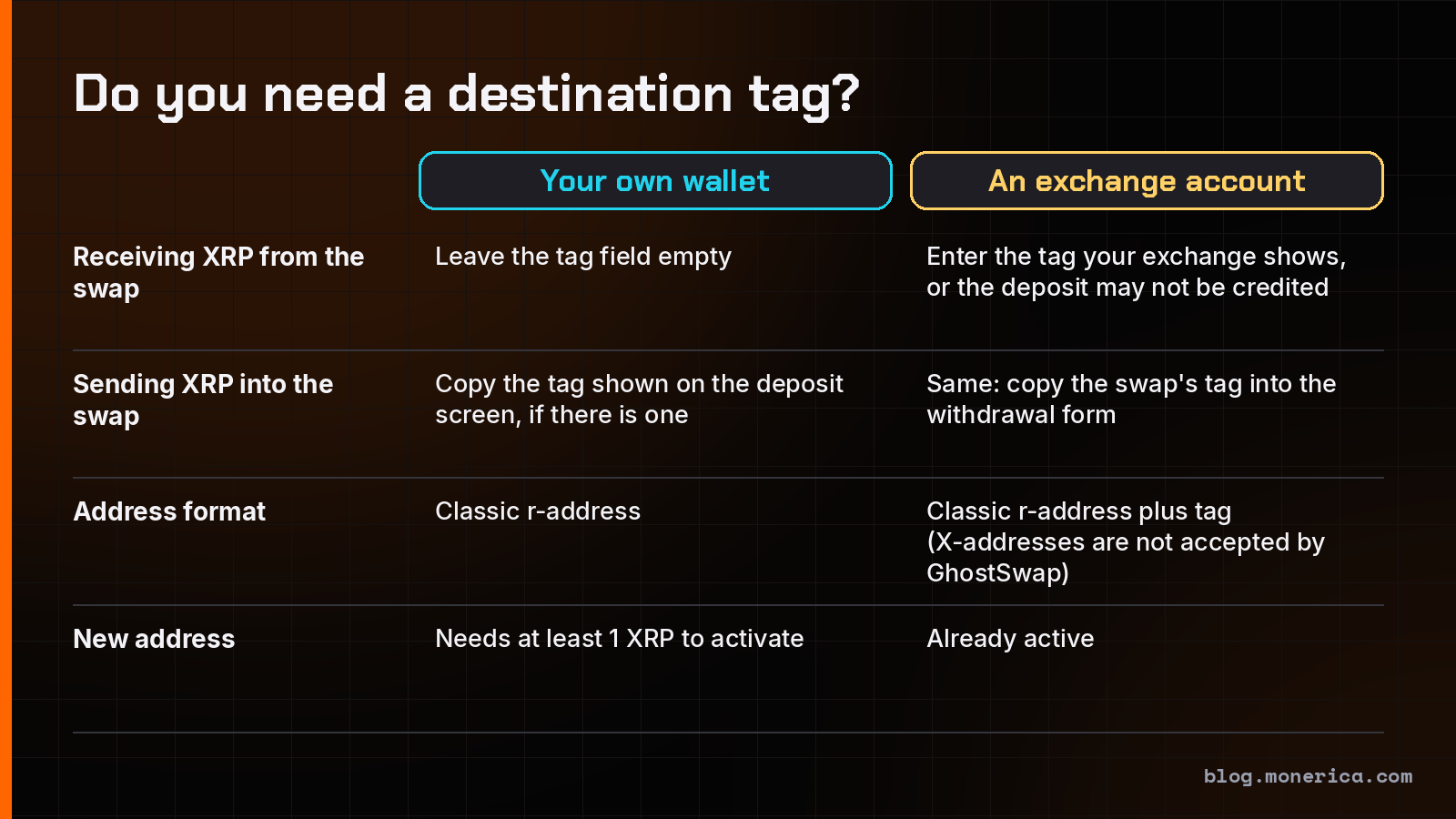
Exchanges receive XRP for all their customers at one shared r-address and tell customers apart by a destination tag, a whole number attached to the payment. The ledger itself ignores the tag; it is the business that reads it. If you send to a shared address without the right tag, the XRP arrives but the exchange does not know whose account to credit, and getting it back means a support ticket. Some businesses switch on a ledger setting that rejects tagless payments outright, which is the better outcome.
For this pair that gives three rules:
- XMR to XRP, paid to your own wallet (Xaman, a Ledger, or any wallet where you hold the keys): leave the tag field empty.
- XMR to XRP, paid to an exchange account: copy both the r-address and the tag from the exchange's XRP deposit page. If the swap form has no tag field, do not use the exchange address: receive the XRP in your own wallet first, then send it on with the tag.
- XRP to XMR: if the swap's deposit screen shows a tag, your XRP payment must carry it. When sending from an exchange, paste it into the withdrawal form's tag (or memo) field.
Some wallets show an X-address, a longer format that packs the r-address and the tag into one string. GhostSwap does not accept X-addresses, so switch the wallet to show the classic r-address and, if needed, the tag separately.
The 1 XRP reserve
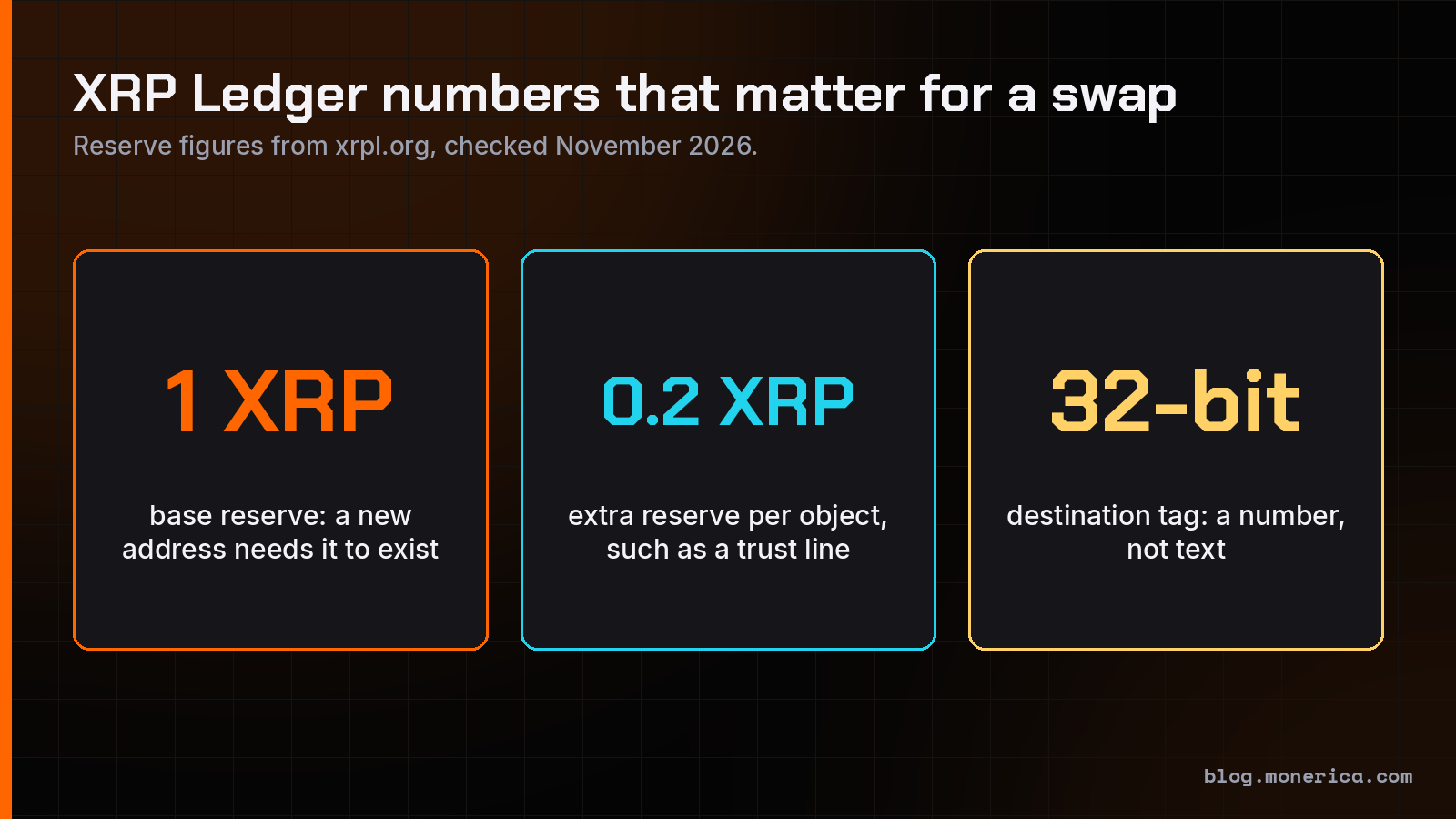
An XRP Ledger address does not exist until it receives enough XRP to cover the base reserve, currently 1 XRP. Each object the account owns, such as a trust line or an open offer, adds an owner reserve of 0.2 XRP. Reserved XRP stays in the account but cannot be sent. For a swap this means:
- XMR to XRP into a brand-new address works, because swap minimums are far above 1 XRP, but 1 XRP of the payout becomes the reserve. Your spendable balance is the payout minus 1 XRP (plus 0.2 XRP per object later).
- XRP to XMR: you can only swap what is above the reserve. A wallet showing 50 XRP with two trust lines can send at most about 48.6 XRP, less the tiny network fee.
How to swap XMR to XRP, step by step
The general flow of a no-account swap is covered in how to exchange Monero. Pair-specific steps:
- Decide where the XRP goes: your own wallet (no tag) or an exchange account (r-address plus tag).
- Copy the classic r-address (and the tag, if any). Check the first and last few characters after pasting.
- Create the swap for XMR to XRP, above the minimum shown. Pick fixed or floating; with a 20-minute wait for Monero confirmations, a fixed rate removes the price risk for a small premium.
- Add a Monero refund address if the form asks: a subaddress from your own wallet.
- Save the order link or ID, then send the exact XMR amount from your wallet.
- Wait about 20 minutes for the confirmations. The XRP payment itself settles in seconds once sent.
Worked example
You want to move 1.5 XMR to an exchange account that lists XRP but not Monero. On 15 November 2026 the reference rate was about 522 XRP per XMR.
- The exchange's XRP deposit page shows an r-address and a destination tag, a number of up to ten digits. You copy both.
- You open a swap and check that it has a destination tag field for the XRP payout. It does, so you paste the address and the tag. (If it did not, you would receive into your own wallet first.)
- The quote, with fees included, is a little under 770 XRP. You choose a fixed rate, paste a fresh Monero subaddress as the refund address, and save the order ID.
- You send 1.5 XMR from Feather. About 20 minutes later the swap pays out; the exchange credits about 770 XRP to your account within a minute because the tag matches.
Had you sent to your own brand-new Xaman wallet instead, 1 XRP of that payout would have gone into the reserve.
How to swap XRP to XMR
- Send from a wallet you control. GhostSwap asks for the r-address the XRP leaves from, and an exchange withdrawal comes from the exchange's address, not yours.
- Prepare a Monero subaddress (95 characters, starts with 8) from a wallet such as Feather, Cake Wallet or the GUI wallet.
- Create the swap for XRP to XMR, above the minimum (about 32 XRP at GhostSwap when checked), and keep your reserve in mind when choosing the amount.
- Pay the deposit address with the tag shown, if there is one. The XRP Ledger confirms in seconds.
- Wait for the XMR. It shows in your wallet straight away as pending and becomes spendable after 10 Monero blocks, about 20 minutes. Why Monero locks received funds.
What it costs
- The spread inside the swap rate is the main cost. Compare the amount you would receive on two services.
- XRP Ledger fees are tiny, a small fraction of one XRP per payment, and are destroyed rather than paid to anyone.
- The Monero fee is a few cents or less. See Monero network fees.
- The reserve is not a fee, but it is XRP you cannot spend while the account exists.
If something goes wrong
- XRP sent to the swap without the tag it showed. Contact the swap's support with the order ID and the XRP transaction hash. Do not send again.
- Payout reached an exchange without a tag. Open a ticket with that exchange, giving the transaction hash from the swap's order page. Only the exchange can credit it.
- "Insufficient reserve" when sending XRP. You tried to send into the 1 XRP base reserve or an owner reserve. Lower the amount.
- XMR to XRP still waiting after 45 minutes. Check the confirmation count on the order page. If it is complete and nothing was paid, contact support with the order ID and your Monero transaction ID; your wallet can also show the transaction key, which proves the payment.
FAQ
Do I need a destination tag to receive XRP in my own wallet?
No. Tags are for shared addresses, mainly exchanges. Leave the field empty when the address is your own.
What happens if I forget the destination tag?
If the receiving address requires tags, the ledger rejects the payment and nothing moves. If it does not, the XRP arrives at the shared address and the business has to work out whose it is, which can take time or fail.
Why can I not send my whole XRP balance?
Because of the reserve: 1 XRP for the account plus 0.2 XRP per object it owns. That XRP stays locked as long as the account exists.
Can I use an X-address?
Not at GhostSwap, which accepts classic r-addresses only. Most wallets can show the classic address and tag separately.
How long does an XMR to XRP swap take?
Usually 20 to 40 minutes: about 20 for Monero confirmations, then seconds for the XRP payout.
Is there an atomic swap for XMR and XRP?
No. Monero atomic swaps work with bitcoin and a few bitcoin-like coins, not with the XRP Ledger.
Sources
- XRPL.org: reserves (1 XRP base reserve, 0.2 XRP owner reserve)
- XRPL.org: source and destination tags (32-bit tags, shared addresses, RequireDest)
- GhostSwap's XMR to XRP and XRP to XMR pair pages (minimums, X-address rule, sender address, checked 15 November 2026)
- SageSwap FAQ (fees and swap times) and its list of supported assets
- Monero Research Lab: the 10-block lock
Nothing here is financial advice. Swap rates, minimums and supported pairs change; confirm them on the service before you send.