Monero (XMR), known for its focus on privacy and untraceability, is one of the most popular privacy-focused cryptocurrencies.
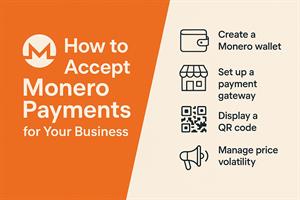
In this guide, we’ll walk you through the steps on how to accept Monero payments for your business, whether you’re running an online store, a service-based business, or a brick-and-mortar shop.
Why Accept Monero Payments?
- Privacy: Transactions are private by default, protecting customer and merchant details.
- Security: Advanced cryptography secures payments end-to-end.
- Low Fees: Typically lower than cards or legacy processors.
- Borderless: Receive payments globally without FX headaches.
- Growing Adoption: Privacy-conscious customers increasingly prefer XMR.
Steps to Accept Monero Payments
1. Create a Monero Wallet
- Desktop: Monero GUI Wallet
- Mobile: Cake Wallet or Monerujo
- Hardware: Ledger or Trezor for cold storage
After setup you’ll have a unique Monero address to receive payments.
2. Set Up a Payment Gateway
For e-commerce, integrate a gateway so checkouts can display an invoice/QR and track status automatically.
Verified E-Commerce Integrations (Monerica)
These options are listed as verified on Monerica and are commonly used with WooCommerce, Magento, OpenCart, and WordPress.
-
(recommended) NOWPayments — 300+ cryptos, ~0.5% fee, plugins for major carts (WooCommerce, Magento, WHMCS) and payout options. (see video)
-
Cryptomus — White-label crypto payment gateway with flexible merchant features.
-
Coin Payments — Plugins for Magento, WooCommerce, OpenCart, and more.
-
MyCryptoCheckout — WordPress/WooCommerce plugin for direct crypto payments.
-
monerowp — Open-source Monero gateway for WooCommerce (self-custody friendly).
-
MixPay — Supports online and in-person flows with instant exchange options.
Verified Open-Source (Self-Hosted)
-
BTCPay — Self-hosted, open-source crypto payment processor. (see BTCPay Server Monero Guide)
3. Generate Payment Addresses & QR Codes
Create unique invoices per order (address + amount + QR). Most gateways automate this; many wallets can generate QR codes if you’re running lean.
4. Display “We Accept Monero” at Checkout
List XMR alongside cards and other methods, and add badges on product/checkout pages so customers know they can pay privately.
5. Manage Price Volatility
- Auto-convert to fiat: Some gateways can settle into bank currency.
- Hold XMR: If you’re long-term bullish, hold with clear treasury rules.
6. Keep Records
Maintain internal logs (order ID, amount, time, status) for accounting/tax. Monero is private, but your books shouldn’t be a mystery.
Best Practices
- Test end-to-end with a small order before launch.
- Educate customers with a short “How to pay with Monero” FAQ.
- Stay compliant with your local tax/regulatory requirements.
Accepting Monero In-Store
- Install a mobile wallet (e.g., Cake Wallet).
- Generate a per-sale QR invoice.
- Confirm receipt in your wallet; ship/hand over goods.
Demo
For a walkthrough on accepting Monero payments with NOWPayments using WooCommerce, see this article or this video.
Conclusion
Accepting Monero gives your customers private, borderless checkout. Start with a secure wallet, plug in a verified gateway, and make the option prominent at checkout. See the full directory of vetted tools on Monerica merchant services.
Frequently Asked Questions
What's the simplest way to accept Monero? Publish a wallet address (ideally a fresh subaddress per order or customer). For automation, add a payment processor that generates addresses and confirms payments for you.
How do I handle price volatility? Either hold the XMR if your margins allow, or convert a portion to fiat/stablecoin as payments arrive. Many merchants do a mix.
Are there chargebacks? No — Monero payments are final once confirmed, which removes card-style fraud reversals but means you should confirm before shipping.
Do I need to report it? In most places crypto sales are taxable events, so keep records of the fiat value at the time of each payment.