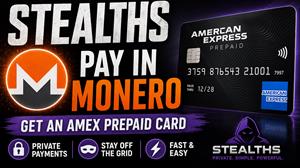
For anyone looking for a clean way to get a working US prepaid card without handing over an ID, an email, or a name — something that loads into Apple Pay and works for normal online purchases — there's a solid option listed on Monerica, the directory of Monero-accepting merchants, in the Cards section under Gift & Prepaid Cards. The vendor is Stealths, and the product is an Amex gift card up to $3,000, paid for in XMR, delivered instantly to the order page.
This is a full review of the buying process, the product, and what it actually looks like once it's loaded into Apple Wallet.
Buy the Stealths Amex Gift Card here
What you're actually getting
It's a real American Express prepaid gift card issued by a US bank, in USD. No name, no address, no account tied to it. Any name and address can be used at checkout when a merchant asks. The card is issued through amexrewardcard.com, which is the legitimate Amex-affiliated portal where balance and transaction history can be checked.
Key specs:
Min purchase is $5, max is $3,000. There's a $5 minimum fee. The card is valid for 6 months and can't be reloaded or extended. US merchants only, USD only.
The buying process
Start at stealths.net, click Store in the top nav, and select the Amex Gift Card US. Enter the amount you want loaded onto the card — the total to pay updates automatically with the fee included. Contact info is optional and can be left blank; the order number is the only thing actually needed to track the order.
Click Buy Now, choose pay with crypto, and select Monero. The site provides an XMR address and the exact amount to send. Pay from your wallet and wait for 10 confirmations — roughly 20 minutes depending on block times.
Once payment confirms, head back to the order page. There's a short wait while the card loads on their end. When it's ready, a Show Card Details button appears. Click it, copy the challenge answer code shown on the page, click View Card, paste the code into the entry field, and hit Continue. Then click to claim the code, and the full card page loads.
From there, the card number, CVV, expiration date, balance, and transaction history are all in one place. That's everything needed to use the card online or load it into a digital wallet.
Adding it to Apple Pay
This is the part most buyers are curious about, since Stealths explicitly doesn't guarantee that digital wallets will accept the card — Apple and Google both run their own IP and trust score checks before letting a new card link.
The process is straightforward: open the Wallet app, tap the plus icon, choose Debit or Credit Card, and enter the card number, expiration, and CVV from the order page. Apple runs its verification in the background, and on a clean Apple ID with a normal IP, the card links successfully. Once added, it sits in the Wallet ready to use, and tap-to-pay works anywhere Apple Pay is accepted, no physical card needed.
Mileage will vary on this — if an Apple ID looks suspicious to Apple, or the connection is on a flagged IP, the card may not link. Worth knowing before buying.
Caveats worth knowing
A few things that will save a headache:
Don't activate over VPN or Tor. Amex's activation flow will detect it and block the card. Use a clean residential connection.
No 3D Secure. Some online merchants — especially in Europe — require 3DS for card-not-present transactions and will decline this card on principle. For most US e-commerce it's fine.
No ATMs, no recurring billing. This is a gift card, not a debit card. Don't try to set it up as a billing method for subscriptions; it'll fail or get the subscription canceled when the card expires.
Test with a small amount first. Acceptance can be inconsistent, so before loading $500 of an order onto it, run a small test charge somewhere to confirm the merchant accepts it.
Don't redeem more than 2 cards from the same device in 24 hours. Stealths flags this as a known limit, presumably because Amex's fraud systems will lock activations beyond that.
6-month validity is real. Use it or lose it — there's no way to extend or reload.
Who this is for
For anyone who wants to buy something online without a card statement showing it, or who wants to fund an Apple Pay transaction without a bank account being involved, this works. It's also useful for anyone who needs a US-issued card while not having a US bank, or who just doesn't want to KYC a fintech for a one-off purchase.
It's not a long-term solution — the 6-month validity and no-reload rule make sure of that — but for what it is, it's clean. Pay in Monero, get a card, load it in Apple Pay, spend it.
Final take
Stealths delivers exactly what the listing says. Payment in Monero, instant delivery, full card details on the order page, and it links to Apple Pay on a clean account on the first try. The caveats are honest and listed up front on the product page rather than buried — which is worth respecting.
For $5 in fees on a card up to $3,000, with no KYC and no identity exposure, this is one of the more practical privacy tools available in the no-KYC card space.
Get the Stealths Amex Gift Card here
Found via the Monerica Cards & Gift Cards directory.