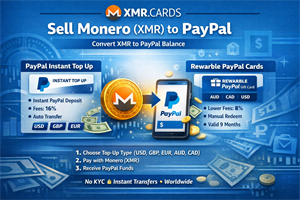
PayPal does not support direct deposits of Monero (XMR), and most exchanges that work with PayPal require full KYC and traditional banking rails. However, you can still effectively convert Monero into PayPal balance by using prepaid PayPal top-ups and PayPal gift cards purchased with XMR.
This guide explains how to use XMR.CARDS to turn your Monero into PayPal credit with:
- PayPal Instant Top Up (USD, GBP, EUR)
- Rewarble PayPal Gift Cards (USD, AUD, CAD)
Official brand pages on XMR.CARDS:
- PayPal Instant Top Up USD
- PayPal Instant Top Up GBP
- PayPal Instant Top Up EUR
- Rewarble PayPal AUD
- Rewarble PayPal CAD
- Rewarble PayPal USD
What Is XMR.CARDS?
XMR.CARDS is a Monero-focused gift card and prepaid platform that lets you spend XMR on digital vouchers, prepaid cards, brand credit, and more. Among its supported brands are several PayPal-related products that allow you to:
- Load PayPal accounts instantly
- Send PayPal balance to yourself or others
- Move value from Monero into the PayPal ecosystem
Method 1: PayPal Instant Top Up (Worldwide)
The PayPal Instant Top Up products on XMR.CARDS are designed to move value straight into a PayPal account after you pay with Monero.
According to the product description:
“PayPal is a service that moves the payment amount from your credit card to the merchant without sharing your financial information.”
Key details for the PayPal Instant Top Up brand on XMR.CARDS:
- Country: Worldwide
- Category: Prepaid Cards
- Min amount: 1 USD (or equivalent)
- Max amount: 1000 USD (or equivalent)
- Fee: 16% + 0.02 USD
- Payment: You pay with Monero (XMR)
You can choose from different currencies:
Important Terms for PayPal Instant Top Up
When you submit the top-up request, you are authorizing XMR.CARDS’ partner (Your Digital Reward) to share personally identifiable information with PayPal, such as your:
- Email address
- Or phone number
This is required so PayPal can associate the top-up with the correct PayPal account.
One critical point from the terms:
“If you submit incorrect information, Your Digital Reward has no ability to update your account information for a period of 30 days, per PayPal policy.”
In other words, you must double-check the PayPal email or phone number you provide when redeeming.
How to Redeem PayPal Instant Top Up
- Buy the PayPal Instant Top Up product on XMR.CARDS with Monero.
- After payment confirms, you receive a redemption link.
- Click the redemption link; it redirects you to PayPal.
- Provide your PayPal email address to receive the funds.
- If you already have a PayPal account: you’ll receive an email that your payment has been automatically transferred to your PayPal balance.
- If you do not have a PayPal account: you’ll receive an email notifying you that the payment is waiting to be accepted.
The result: you have effectively sold Monero for PayPal balance by using a prepaid top-up product.
Method 2: Rewarble PayPal Gift Cards (Worldwide)
The second route is via Rewarble PayPal gift cards, also sold on XMR.CARDS.
The Rewarble product description:
“PayPal is an online payment system that allows you to send and receive money around the world. It caters to various needs, be it making an online purchase, sending a gift, or paying a fee. PayPal Gift Card allows you to deposit funds instantly to a PayPal account holder. Brought to you by Rewarble.”
Key details for Rewarble PayPal USD on XMR.CARDS:
- Country: Worldwide
- Category: Prepaid Cards
- Min amount: 1 USD
- Max amount: 1000 USD
- Fee: 8%
- Gift card validity: 9 months
Available currencies (via XMR.CARDS):
Rewarble Redemption Process
Rewarble uses a short redemption flow to move value from your gift card into PayPal:
- Visit the redemption website: www.rewarble.com/redeem
- Enter your Rewarble PayPal gift card number and click Redeem.
- Enter the PayPal email address you want to top up.
- Click Confirm to send the funds to that PayPal account.
Once confirmed, the PayPal account is topped up instantly. Just note the voucher’s 9-month validity—redeem it before it expires.
PayPal Instant Top Up vs Rewarble PayPal
Here is a simple comparison to decide which route is better for you:
| Feature | PayPal Instant Top Up | Rewarble PayPal |
|---|---|---|
| Supported Region | Worldwide | Worldwide |
| Category | Prepaid Cards | Prepaid Cards |
| Min / Max Amount | 1–1000 USD (or equivalent) | 1–1000 USD (or equivalent) |
| Fees | 16% + 0.02 USD | 8% |
| Redemption Flow | Redemption link → PayPal site → enter email | Rewarble site → enter card → enter PayPal email |
| Validity | Applies immediately | Voucher valid for 9 months |
| Best For | Maximum convenience and simplicity | Lower fees and flexibility |
In short:
- Choose PayPal Instant Top Up if you prioritize ease of use and quick, direct top-ups.
- Choose Rewarble PayPal if you want to reduce fees and do not mind a short redemption step.
Step-by-Step: Convert Monero to PayPal Balance
Step 1: Pick Your Product and Currency
Decide whether you prefer PayPal Instant Top Up or Rewarble PayPal, and choose the currency that matches your PayPal account or needs:
- Instant Top Up USD
- Instant Top Up GBP
- Instant Top Up EUR
- Rewarble PayPal USD
- Rewarble PayPal AUD
- Rewarble PayPal CAD
Step 2: Choose the Amount
Within the allowed limits (usually 1–1000 in the chosen currency), set how much PayPal balance you want to receive, then proceed to checkout on XMR.CARDS.
Step 3: Pay with Monero (XMR)
On the payment screen, select Monero as your payment method. XMR.CARDS will provide:
- A Monero address
- The exact XMR amount to send
Send the exact amount from your Monero wallet and wait for the network confirmations shown by XMR.CARDS.
Step 4: Redeem to PayPal
After your payment confirms:
- If you used PayPal Instant Top Up: follow the redemption link, go to PayPal, and provide your PayPal email to have the funds deposited automatically or made available to claim.
- If you used Rewarble PayPal: go to www.rewarble.com/redeem, enter your gift card number, then provide your PayPal email and confirm to complete the top-up.
Once done, your PayPal account will show the added balance, and you have successfully converted Monero into PayPal credit.
Is This “Selling Monero” to PayPal?
While you are not selling XMR on a traditional exchange, the end result is very similar:
- You spend Monero to purchase a PayPal-related prepaid product on XMR.CARDS.
- You redeem that product so value lands in a PayPal account.
- You now have spendable PayPal balance instead of XMR.
Functionally, this allows you to:
- Pay online where PayPal is accepted
- Send money to other PayPal users
- Cash out via PayPal’s withdrawal options in your region
Tips and Best Practices
- Double-check the PayPal email or phone number before confirming any top-up.
- Consider starting with a smaller amount to test the process.
- For Rewarble, note the 9-month validity and redeem well before expiry.
- Keep an eye on fees and choose the option (Instant vs Rewarble) that fits your priorities.
Using XMR.CARDS’ PayPal Instant Top Up and Rewarble PayPal gift cards, you can bridge private Monero payments into the PayPal ecosystem without relying on traditional crypto exchanges.