Running your own Monero (XMR) node is the most private way to use a wallet: your wallet talks only to your node, not to someone else’s. This guide uses the official figures from October 2026 to show how much disk, RAM, CPU and bandwidth you need for a full or pruned node, and which ports to open.
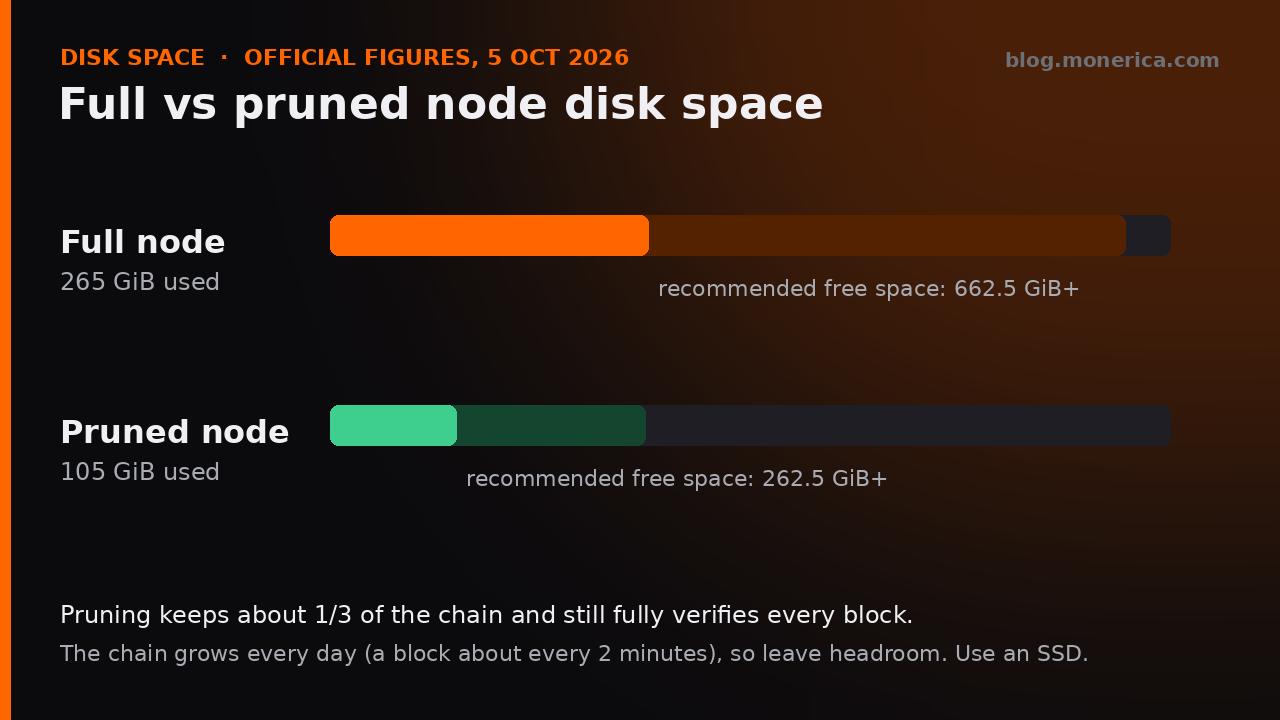
- Short answer: A pruned node needs about 105 GiB today (keep 262.5 GiB+ free), a full node about 265 GiB (keep 662.5 GiB+ free). Use an SSD and at least 4 GB of RAM.
- Most people: run a pruned node. It verifies everything a full node does, with about a third of the disk space.
Requirements at a Glance (October 2026)
- Blockchain size: ~265 GiB full, ~105 GiB pruned (official Monero docs, 5 October 2026).
- Free disk space to plan for: 662.5 GiB+ (full) or 262.5 GiB+ (pruned), to allow for growth.
- RAM: 4 GB+ recommended; 8 GB makes the first sync noticeably smoother.
- CPU: any modern 2–4 core CPU. More cores speed up the first sync.
- Storage type: SSD or NVMe strongly recommended. A hard drive works but syncs far more slowly.
- Software: Monero v0.18.5.4 “Fluorine Fermi” (CLI or GUI), for Linux, Windows and macOS.
Full vs Pruned Node
- Full node: keeps the entire blockchain and can serve all of it to other nodes. Choose it if you have the space and want to give the most back to the network.
- Pruned node: keeps about one third of the chain after verifying it. It still checks every block and transaction, and your wallet privacy is the same.
The chain grows every day (a new block about every 2 minutes), so buy more space than today’s numbers. For the history and growth rate, see Monero Blockchain Size.
Hardware
Storage
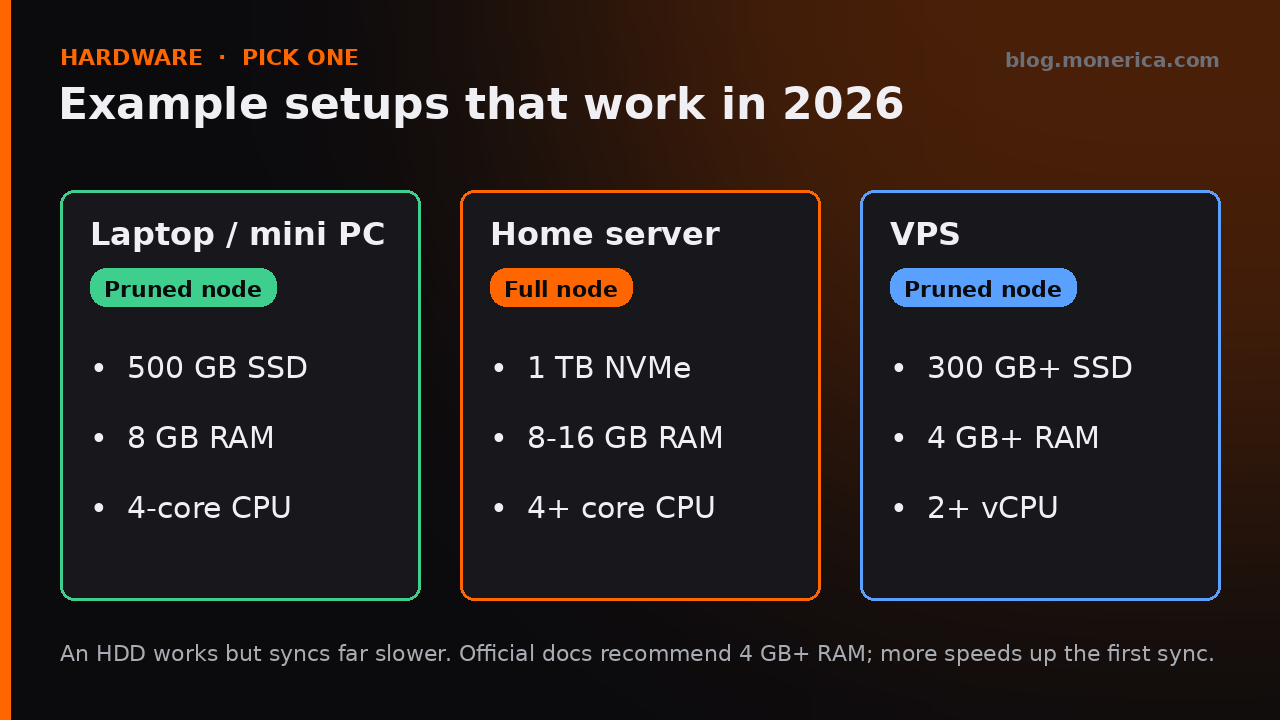
- Pruned: a 500 GB SSD leaves comfortable room.
- Full: a 1 TB SSD or NVMe is the practical minimum for the next few years.
- Hard drives: they work, but the first sync can take many times longer because the database does a lot of random reads and writes.
Memory (RAM)
- The official docs recommend 4 GB+. 8 GB or more gives the database more cache during the first sync.
CPU
- A modern 2–4 core CPU is plenty once synced. Extra cores mainly help the first sync, when every past transaction is verified.
- Coming up: the planned FCMP++ upgrade is in public testing (stressnet) with no mainnet date announced as of October 2026. Check getmonero.org for news before buying very low-power hardware.
Bandwidth
- First sync: you download roughly the size of the chain. Adding
--sync-pruned-blocksto a pruned node downloads less. - After that: traffic depends on how many peers you serve. On a capped connection, limit it with
--limit-rate-up/--limit-rate-down(in kB/s) or fewer peers with--out-peers/--in-peers.
Ports
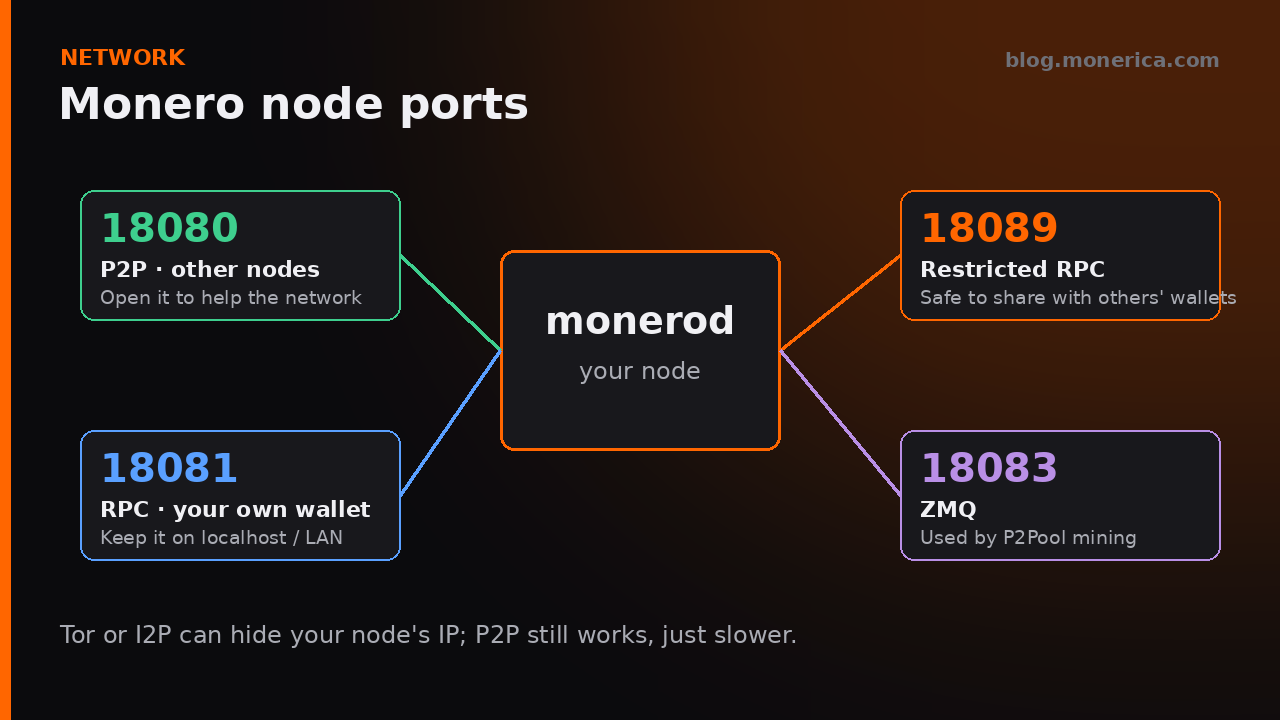
- 18080 (P2P): open it on your router/firewall so other nodes can connect. Not required, but it helps the network.
- 18081 (RPC): for your own wallet. Keep it on localhost or your LAN.
- 18089 (restricted RPC): the usual port for letting other people’s wallets use your node. Enable it with
--rpc-restricted-bind-ip 0.0.0.0 --rpc-restricted-bind-port 18089and open the port. - 18083 (ZMQ): only needed for P2Pool mining (
--zmq-pub tcp://127.0.0.1:18083). - Tor / I2P: both can hide your node’s IP address from peers and your ISP.
Useful Startup Options
--prune-blockchain: run a pruned node (from a fresh sync).--sync-pruned-blocks: with pruning, download already-pruned blocks to save bandwidth and time.--enable-dns-blocklist: skip peers on the community blocklist of known bad nodes.--data-dir: put the blockchain on your SSD if it isn’t your system drive.
Full list: our monerod startup flags reference. Already have a full node and want to shrink it? Run monero-blockchain-prune.
Where to Run It
- At home: a mini PC or old laptop with an SSD is ideal. Leave it on, and your wallets always have a private node.
- VPS: pick one with at least 300 GB SSD for a pruned node. Many hosts accept Monero: see where to buy a VPS with Monero.
- Don’t want to run one yet? Use a trusted public node until you do.
FAQ
How long does the first sync take?
It depends mostly on your disk and connection. On an SSD with a good connection, expect roughly a day or two; on a hard drive it can take a week or more.
Is a pruned node less private?
No. Your wallet gets the same privacy from a pruned node. Pruning only changes how much old data you can share with other nodes.
Can I run a node on a Raspberry Pi?
Yes, a Raspberry Pi 4 or 5 with 4–8 GB RAM and an external SSD can run a pruned node. The first sync is slow; after that it keeps up fine.
Do I need to keep it on 24/7?
No, but it has to catch up each time you start it. Leaving it on means it’s always ready for your wallet.
Sources
- Official blockchain size and recommended space: Monero Docs – Running a node via systemd
- Downloads (v0.18.5.4): getmonero.org/downloads – always verify the signed hashes.
- More node tools and hosts: Monerica – Nodes
Related Articles
- Monero Blockchain Size (2026): Pruned vs Full
- Monero Node List (2026): Public Nodes, One-Click Installers, & More
- Best Monero (XMR) Wallet For Desktop & Mobile
- Where to Buy a VPS with Monero